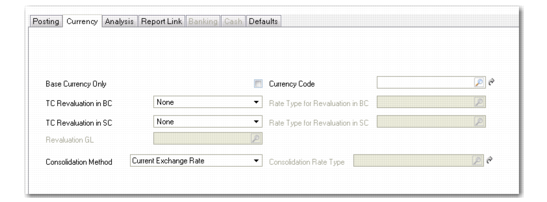
Revaluation Methods and Rates
You define the revaluation methods and rates for a source GL account in the Currency tab of Account Create (25.3.13.1). The tab lets you define both methods and rates for the revaluation of transaction currencies against the base currency and the statutory currency.
Five options are available for the revaluation method:
None: No revaluation is performed.
Accounting Rate: The accounting exchange rate for that date is used; this is the most common option.
Revaluation Rate: You can use a separate rate. For example, in certain countries, the government sets the rate that must be used for revaluation, and this is separate from the accounting exchange rate.
Inventory Rate: This option is available for revaluation relative to the statutory currency for Inventory and WIP control accounts, and uses the inventory exchange rate.
You must revalue open balances in Inventory and WIP control accounts relative to the statutory currency to report closing valuations for the balance sheet.
Statutory Rate: This option is available for revaluation relative to the statutory currency, and uses the statutory exchange rate. If the option is defined in Exchange Rate Type Create, the system can revert to using the accounting exchange rate if there is no valid statutory exchange rate available at the time of revaluation.
User-Defined Rate: This option accommodates situations where different revaluation rules apply for particular types of assets.
When you select the Revaluation method in the TC Revaluation in BC field, ensure that a revaluation exchange rate type is defined for all currencies used in postings to the account. Similarly, when you select the Revaluation method in the TC Revaluation in SC field, ensure that a statutory exchange rate type is defined for all currencies used in postings to the account.
The default exchange rate type is the accounting exchange rate. When you use a currency for which no exchange rate has been configured, the system has the option to revert to using the accounting exchange rate, depending on a setting in Exchange Rate Type Create. If no accounting exchange rate is defined, the transaction cannot be posted. See
Exchange Rate Types for more information.
You can also use a user-defined exchange rate type for revaluation. This rate is active when you define the TC and SC revaluation methods as User-Defined, on the Currency tab of the target GL account. Typically, you use User-Defined as the revaluation method when you want to keep historical records of revaluation for different GAAP reporting purposes.
See
Currency Tab for more information on the revaluation fields for GL account setup.
Revaluation Settings on a Supplier Control Account
Revaluation Parameters describes the revaluation parameters and values for transaction currencies.
Revaluation Parameters
TC Revaluation in BC/SC | Rate Type for Revaluation in BC/SC | Description |
None | Revaluation is not applicable, and the Rate Type for Revaluation in BC/SC field is unavailable. | The account is not revalued. |
Accounting Rate | Revaluation is applied, and the Rate Type for Revaluation in BC/SC field is unavailable. | The system uses the accounting exchange rates that are valid at month-end. |
Revaluation | Revaluation is applied, and the Rate Type for Revaluation in BC/SC field is unavailable. | The system uses the revaluation exchange rate type that is valid at month-end, but it can revert to using the accounting exchange rate, if the Fallback to Accounting field in Exchange Rate Type Create (26.3.1) is selected for the revaluation exchange rate. The system displays a warning during the revaluation if it is reverting to using the accounting exchange rate. |
User-Defined | Any exchange rate with a user-defined exchange rate type. | The system uses the exchange rates of the user-defined type in the Rate Type for Revaluation in BC/SC field. |
Statutory | Only available in the TC Revaluation in SC field. Statutory currency revaluation is applied, and the Rate Type for Revaluation in SC field is unavailable. | The system uses the statutory exchange rate type that is valid at month-end, but it can revert to using the accounting exchange rate, if the Fallback to Accounting field in Exchange Rate Type Create (26.3.1) is selected for the statutory exchange rate. The system displays a warning during the revaluation if it is reverting to using the accounting exchange rate. |
Inventory | Only available in the TC Revaluation in SC field. Statutory currency revaluation is applied, and the Rate Type for Revaluation in SC field is unavailable. | Inventory and WIP balances in statutory currency must be revalued to use the latest inventory exchange rate when: • The inventory exchange rate type is used to calculate standard costs in statutory currency. • Standard costs in base currency are reviewed periodically and the inventory exchange rates are modified. |