Financial Matching
Financial matching is used for payments for products or services that have not been processed through the purchasing cycle. The invoice amounts are not matched against purchase order amounts. Instead they are posted to an Unmatched Invoices account, and then allocated directly to a cost account. These invoices would typically be one-time payments to suppliers for occasional goods or services, or payments for utilities, such as telephone bills and electricity, for which orders are not used.
The postings for financial matching are in two stages, moving amounts into and out of the system Unmatched Invoices account. All transactions are stored in transaction currency (TC), base currency (BC) and, if activated, in statutory currency (SC).
Debit Unmatched Invoices
The system automatically uses an Unmatched Invoices account in all supplier invoice postings created in a particular domain; this is true for both invoices associated with purchase orders and those that are not. However, when matching credit notes, the Unmatched Invoices account is credited.
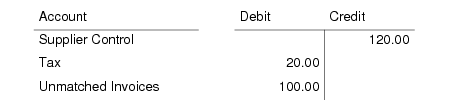
These postings are as follows:
The Supplier Control account is the default defined for each supplier. The Tax account is retrieved from the Global Tax Management (GTM) setup for this supplier.
You must create one (and only one) Unmatched Invoices account for your system. The Unmatched Invoices account is a system GL account.
This posting is mandatory for all invoices and is always made to the official accounting layer, using a supplier invoice daybook. Posting details are visible on the SI Posting tab; see
SI Posting Tab.
Credit Unmatched Invoices
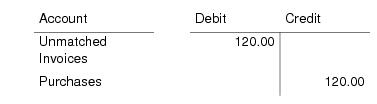
The next stage of the update moves the amounts out of the Unmatched Invoices accounts, and debits either a Purchases accounts (for non-inventory items) or a PO Receipts account. The Purchases account specified by the Purchases Account profile on the supplier is the default. Instead of the Purchases account, the postings can involve, for example, one or more GL accounts, or the same GL accounts with multiple cost centers.
Purchases Account
This posting moves the invoice amount less tax from the Unmatched Invoice account into the Purchases account you defined for this supplier. The default account is contained in the purchase GL account profile, which you define on the Accounting tab of the supplier; see
Accounting Tab. However, you can use another account instead of the default Purchases account.
The posting uses a matching daybook, and you can select a matching daybook that uses either the official layer or the transient layer for approval, depending on the invoice status code you assign.
These posting details are visible on the Matching Posting tab; see
Matching Posting Tab.
PO Receipts Account
This posting moves the invoice amount, excluding tax, from the Unmatched Invoice account into different Purchase Order Receipt and variance accounts, depending on the type of receiver matching you perform. You set the posting details for these matching postings in the Matching Data area of Receiver Matching Create.
Note: If taxes are accrued at receipt, the PO Receipts postings include taxes.