Standard Invoices and Taxes
Taxes on received goods are accrued either when the receipt is booked or when the invoice is created. When you accrue tax at receipt, tax amounts are included in the receiver amounts to be matched against the invoice total. See
Tax Calculation During Matching. Taxes accrued at invoice are not included in the total invoice amount to be matched against receivers.
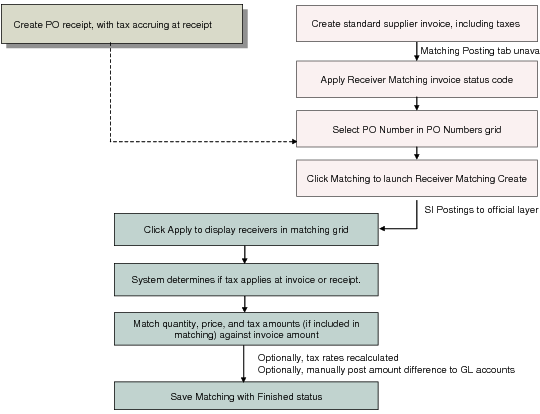
Receiver Matching Flow for Standard Supplier Invoice illustrates the matching flow for a standard invoice with taxes accruing at receipt.
Receiver Matching Flow for Standard Supplier Invoice
When the matching amount, including taxes accrued at receipt, does not equal the invoice total, you can use manual posting to offset the difference. However, when a difference between matching amount and invoice amount is caused by a user error, you have the following options:
The matching clerk has made a mistake in entering the matching amounts.
Receiver matching can be saved with a status of Initial, which does not complete the matching postings, and which lets you review the matching amounts before completing the process.
The AP clerk has entered the wrong amount on the original invoice.
If the amount was incorrectly entered by your AP department, you can use Supplier Invoice Reverse to reverse the invoice postings, as well as any linked matching postings, and Supplier Invoice Replace to replace this invoice with a corrected version. The Reverse and Replace functions allow you to retain the financial and tax data of the original invoice. When you have multiple lines on an invoice of which only one is incorrect, you can therefore use Reverse and Replace to copy the original invoice, correct the invalid line, and post the replacement, without the need to re-enter every line and detail. Supplier Invoice Reverse and Replace also lets you reverse matching postings linked to an incorrect invoice, and so to begin matching again with the correct version. See
Reversing and Replacing Supplier Invoices.
The supplier submitted an invoice for the wrong amount.
In cases where the matching amount is correct, but the invoice amount on the original supplier document was obviously incorrect, you process the receiver matching for the amount stated on the invoice, recording a rate variance, and then request a credit note from the supplier to offset this variance.