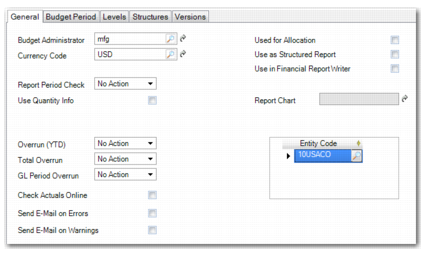
General Tab
Use the General tab to specify the scope of the budget activities and the entities that provide the budget actuals. The fields let you specify the budget currency and budget administrator, along with the use of this budget.
In addition, specify whether the Budget daemon must poll for actuals containing budget COA data, and the level of action the system takes for budget overruns.
Budget Create, General Tab
Field Descriptions
Budget Administrator
Specify the ID of the user responsible for administration of the budget. This field defaults to the current user, but you can modify this value.
The user you specify receives e-mails when budget amounts are overrun if you have selected the option to send e-mails on errors and warnings.
The system sends the e-mail to the address defined in User Maintenance (36.3.1) for the user specified in the Login field. For more information on user settings, see
QAD Security and Controls User Guide. and for details on setting up e-mail, see
QAD System Administration User Guide.
Currency Code
Specify a budget currency. The field defaults to the base currency for the domain, but you can modify this value.
If you specify a currency other than the base currency, the system uses a specific budget exchange rate type to convert between the budget currency and the base currency. If a budget exchange rate for the two currencies is not defined, the system uses the current accounting exchange rate.
See
Exchange Rate Types for more information on exchange rate types.
Note: You cannot modify the currency if the budget has a status of Operational.
Report Period Check
Choose whether the system validates if a reporting period is open when a transaction is posted for that period. This field is not available if you select the Use in Financial Report Writer field.
No Action: The system lets users enter transactions in closed/reported periods.
Warning: The system warns the user that the period is closed/reported, but lets the user save the transaction.
Error: The system warns the user that the period is closed/reported, and prevents the user from saving the transaction.
Reporting periods for budgets are set up in Report Period Create. See
Budget Report Periods.
Use Quantity Info
Select to budget using quantities, such as machine hours, kilowatt hours, or other quantifiable values. You can then link GL accounts defined to accept units of measure to the budget.
The Budget daemon compares the quantities entered for the GL account to the budgeted quantities. For example, a budget structure can include accounts for tracking kilowatt hours. The daemon updates the budget with the kilowatt hours entered for the account.
Overrun (YTD), Total Overrun, GL Period Overrun
Choose how the system responds if the budget amounts from the start of the budget period to date, for the entire budget, or for a particular budget period are overrun. In each field, the options are No Action, Warning, or Error. These fields are not available if you select the Use in Financial Report Writer field.
No Action: The system allows the user to enter transactions that cause overruns.
Warning: The system warns the user that the budget is overrun, but allows the user to save the transaction.
Error: The system prevents the user from saving a transaction that overruns the budget figure.
Note: Use the Topic Properties screen to set responses for budget topics that override the settings in the General tab. See
General Tab.
Check Actuals Online
Select the field to enable the online budget check.
Each time a linked budget account is specified in banking entry, journal entry, customer and supplier invoices, open item adjustment, or petty cash activities, the system determines if the new transaction causes the budget amounts to be overrun.
In addition, if you choose Warning or Error in the Overrun (YTD), Total Overrun, or GL Period Overrun fields, the system displays a warning or error if a transaction causes a budget overrun for the corresponding time frame.
Note: This field has an effect only when Online Budget Check is selected in the system settings in System Maintain (36.24.3.1).
Send E-mail on Errors, Send E-mail on Warnings
Select the relevant field to send an e-mail to the budget administrator if an overrun error or warning occurs. The system sends the e-mail to the address defined in User Maintenance (36.3.1) for the user specified in the Budget Administrator field.
The system generates errors or warnings when the budget is overrun and if Error or Warning is selected in one or more of the Overrun (YTD), Total Overrun, or GL Period Overrun fields.
Used for Allocation
Select the field if the budget structure is used for allocations.
Only accounts, sub-accounts, projects, cost centers, and SAFs can be used in allocation structures.
See
Setting Up Allocations and
Running Allocations for more information on allocations.
Use as Structured Report
Select the field if the budget structure is used to define a report hierarchy for the Balance Sheet and Income Statement structured reports.
When you select Use as Structured Report, the system validates and categorizes the report structure data differently than general budget data. In addition, selecting the Use as Structured Report field makes the report structure available in the selection criteria of the Financial Statement ProForma, Balance Sheet, and Income Statement reports.
Use in Financial Report Writer
Select this field if the budget is to be used for financial reports. You can include the budget as a column in a report to compare the budget amounts with actual postings. The Use in Financial Report Writer field is exclusive. You cannot select it in combination with the Used for Allocation or the Use as Structured Report fields.
Report Chart
This field is only available if you select the Use in Financial Report Writer field. Enter a valid report chart of accounts or click the lookup and select a report chart of accounts from the Report Chart Search list. When you select a report chart, the Entity Code field is automatically populated with the entities associated with that chart.
Entity Code
Specify the entities that update actuals for the budget. A budget can link to one or more entities that share the same COA shared sets used in the budget structure. The entities can be in the same or different domains.
The Budget daemon only links actuals postings to budget topics if the postings originate in one of the entities specified in this field.
If you specify more than one entity, the system updates and compares actuals from all entities in the list to the budget amounts.
Important: For Financial Report Writer budgets, the Entity Code field is automatically populated with all entities linked to the report chart. The list of entities is read-only. If you want the budget to apply to only a few entities, add topics at the highest level in the budget structure and link those topics to report analysis codes that contain the entities you require. This step facilitates the link between the budget structure and the report tree structure.