Creating a Consolidation Cycle
Use Consolidation Cycle Create (25.19.1.7) to create a consolidation cycle in the consolidation entity that defines the consolidation structure. You indicate the source and target entities and whether consolidation is full or proportional.
A consolidation cycle can have one of three statuses: Initial, Valid, and Operational. Initial is the first status of the cycle, and no validation is performed. When the cycle status is set to Valid, the system checks to ensure that the GL period and COA cross-references are consistent.You can only initiate a consolidation run using cycles with the status Operational.
When creating a consolidation cycle, you can indicate whether to include sub-accounts, cost centers, projects, and SAFs. For a consolidation cycle with a status of either Valid or Operational, and which includes analysis (sub-account, cost center, project, or SAF), a default value must be provided.
An entity can be a consolidation entity for several source entities in one consolidation cycle and a source entity in another consolidation cycle. The consolidation process is started in the consolidation entity for a range of periods or for one period.
For each source entity defined in a consolidation cycle, you can specify a COA cross-reference. The COA cross-reference should be defined in the same domain as the source entity.
The consolidation entity is the target entity for consolidation purposes. It is used to generate reports on the GL movements of the source entities, using the full range of GL reports. See
Reporting.
You can modify consolidation cycles to define or remove a new source entity, change the participation percentage of an existing source entity, or associate or change a daybook code.
You add source entities to the consolidation cycle by inserting a new row.
You also add the daybook codes for the consolidation transactions. You specify a daybook for each source layer, and the system stores the consolidation transactions in the appropriate consolidation daybook.
For example, when you specify a consolidation daybook for the management layer, all source entity transactions in the source management layer are stored using this daybook following consolidation. You need only specify daybooks for the layers you intend to use.
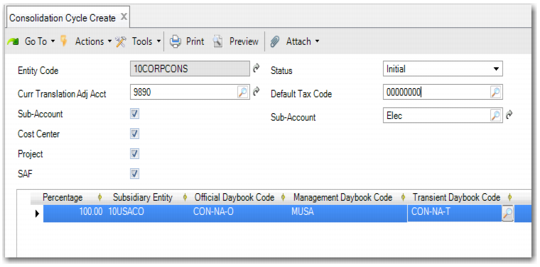
Consolidation Cycle Create
Field Descriptions
Entity Code
The system displays the code of the entity you are logged in to. This is the consolidation entity. This entity must have been marked as a consolidation entity in the Entity function before you can create the cycle.
Status
Specify the status of the consolidation cycle:
Initial: No validation checks are performed.
Valid: The system checks both the source entities and the consolidation entity to ensure that the GL period and COA cross-references are consistent.
Operational: You can initiate the consolidation run using Consolidation Create.
Sub-Account
Select this field to indicate that the GL transaction must be transferred with the associated sub-account code. Source sub-accounts are then translated to the mapped consolidation value using the COA cross-reference definition.
Default Sub-Account
Specify the default sub-account to apply to target GL transactions. The default sub-account is used when the target account has sub-account analysis, but the source account does not, or when the source account has sub-account analysis, but you have chosen to exclude sub-accounts during consolidation.
Currency Translation Adj Acct
Specify the GL account to which to post currency differences generated by translation adjustments during the consolidation. This should be a standard account, defined in the base currency, and can be either a balance sheet or income statement account.
The account lookup only displays GL accounts defined with the base currency.
Default Tax Code
Specify a default tax code to be applied to tax account transactions in the consolidation entity. You use this tax code to identify tax account transactions in the consolidation for reporting purposes only.
Cost Center
Select this field to indicate that the GL transaction must be transferred with the associated cost center code. Source cost centers are then translated to the mapped consolidation cost center value using the COA cross-reference definition.
The default cost center defined in the Default Analysis window is used when the target account has cost center analysis, but the source account does not. The default cost center is also used when the target account and source account both have cost center analysis, but cost centers are excluded from the consolidation. See
Default Analysis.
If the Cost Center field is cleared, the source entity cost center is not included in the consolidation. However, if the target account is defined with cost center analysis, the default cost center from the consolidation cycle is used to create the target consolidation posting.
Project
Select this field to indicate that the GL transaction must be transferred with the associated project code. Source projects are then translated to the mapped consolidation project value using the COA cross-reference definition.
The default project defined in the Default Analysis window is used when the target account has project analysis, but the source account does not. The default project is also used when the target account and source account both have project analysis, but projects are excluded from the consolidation. See
Default Analysis.
If the Project field is cleared, the source entity project is not included in the consolidation. However, if the target account is defined with project analysis, the default project from the consolidation cycle is used to create the target consolidation posting.
SAF
Select the field to include SAFs in the consolidation cycle.
If SAFs are included in the consolidation cycle:
• If a transaction in the source entity contains SAFs, and the source account is mapped to an account without SAFs in the consolidation entity, the consolidation transaction does contain SAFs.
• If the transaction in the source entity does not include SAFs, and the target account COA in the consolidation entity includes SAFs, the consolidation transaction contains SAFs that default from the GL account, cost center, project, or SAF structure defined in the consolidation cycle. See
Default Analysis.
• If both the transaction in the source entity and the target account include SAFs, the source entity SAFs are posted to the consolidation transaction, regardless of the SAF definitions in the consolidation entity.
If SAFs are not included in a consolidation cycle, no SAF information from subsidiary entities is passed to the consolidation transactions.
Default Analysis
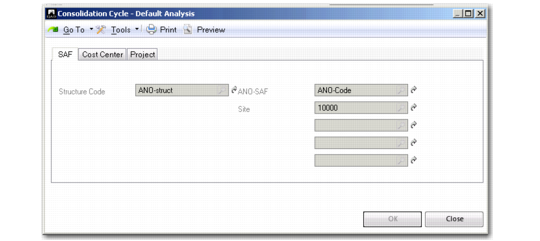
Click the Default Analysis button to display a new window with multiple tabs where you can configure default SAF, cost center, or project analysis for the consolidation.
Consolidation Cycle Create, Default Analysis
When source transactions use SAF, cost center, or project analysis, the system applies the defaults you define here to the consolidation transactions.
Use the SAF, Cost Center, and Project tabs to set defaults for each type of analysis, if required. When you define a default SAF structure, you can select one or more default SAF codes for the SAF concepts within the structure. You must select one default SAF code for every SAF concept. You can also define SAF structures for cost centers and for projects, if required. See
Supplementary Analysis Fields.
Source Entity Grid
Percentage
Specify the participation (1 to 100%) the consolidation entity holds within the source entity.
This value can be changed at any time. You can track these changes using the Period From and Period To dates.
Source Entity Code
Specify the code that identifies one of the source entities for this consolidation.
Official Daybook Code
Specify the target official layer daybook code to which source official layer transactions are posted during consolidation.
Management Daybook Code
Specify the target management layer daybook code to which source management layer transactions are posted during consolidation. This field is optional.
Transient Daybook Code
Specify the target transient layer daybook code to which source transient layer transactions are posted during consolidation. This field is optional.
Cross-Reference
Specify the COA cross-reference that the system must use to translate the source COA elements to the specified target COA elements in the consolidation entity.