Setting Up Consolidation
The system uses source and target entities in the consolidation process. Source entities are the subsidiary entities whose accounts you want to consolidate. The target entity is the consolidation entity, in which you combine the source account transactions.
From within the consolidation entity, you create a consolidation cycle, which identifies the source entities, the daybooks to be used for transactions in each entity, and the participation percentage to be applied to each entity.
Consolidation is performed for a set GL period, and you must align your consolidation entity GL periods with those of the source entities. You must map GL accounts, sub-accounts, cost centers, and projects in the source entities to the target COA elements in the consolidation entity. You can also use COA Cross Reference Excel Integration (25.3.14.6) to load cross-reference mappings from an Excel spreadsheet.
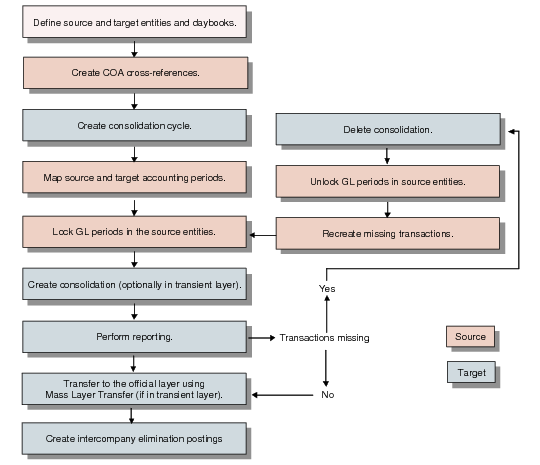
The following figure illustrates the basic steps.
Consolidation Flow
1 Create the source and target entities and daybooks required for consolidation.
2 From within each of the source entities, map source and target GL accounts and, optionally, sub-accounts, cost centers, and projects, to create COA cross-references for use in the consolidation cycle. Each subsidiary entity and the COA cross-reference it uses must belong to the same domain. See
Creating COA Cross-References.
3 From within the consolidation entity, create the consolidation cycle, which defines the source entities and daybooks to use. See
Creating a Consolidation Cycle.
5 From within each of the source entities, lock the GL periods that are to be included in the consolidation. See
Modifying Entity GL Periods.
6 From within the consolidation entity, create the consolidation. In this step, you define source and target accounting layers, set the GL period range, and run the consolidation. See
Creating a Consolidation