Setting up Mirror Accounting
Configure mirror accounting using the following steps.
1 Define mirror accounting for the entity or domain. Mirror accounting is defined as an attribute of the entity and can be enabled per entity or per domain. See
Setting Up Entities. When you enable mirror accounting for the domain, it is activated for each entity by default.
Mirror accounting is then enabled in the current entity when:
• It is activated for this entity.
• A daybook for inventory control transactions has been defined for the entity.
• Each source daybook has a mirror daybook
Defining Source and Mirror Daybooks
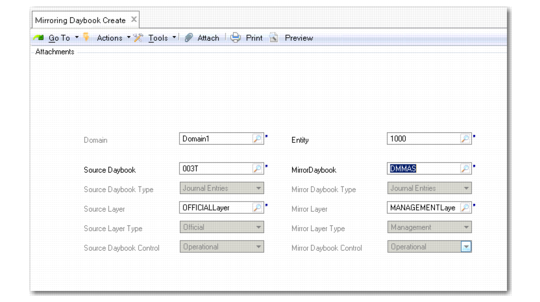
Use Mirroring Daybook Create (3.20.6.1) to create, modify, delete, and view source and mirror daybooks. You create the source and mirror daybooks as a linked pair.
You can select the same daybook for both source and mirror, and the mirror daybook can be any daybook of type Journal Entry in either the official or management layer. You can also use source and mirror daybooks of type Periodic Costing with both belonging to the transient layer.
You can, for example, define management layer daybooks for your mirror transactions, and generate management reports for this layer only. Each source daybook must have a mirror daybook to enable mirroring, and at least one transaction must be posted in the source daybook.
The following restrictions apply when defining source and mirror daybooks:
• The daybooks can be in either official or management layer, but at least one must be in the official layer.
• The source and mirror daybook type must be of type Journal Entry or of type Periodic Costing.
• The source and mirror daybook control (operational only) must be the same.
When a mirror transaction is split, and a sub-transaction is posted to a mirror daybook, the system retrieves the mirror daybook by checking the source daybook and identifying the other half of the pair.
Mirroring Daybook Create
Field Descriptions
Domain
This read-only field displays the current domain.
Entity
Specify the entity in which the mirror transactions are generated. You can only select entities in the current domain.
Source Daybook
Specify a daybook for the source transactions.
Mirror Daybook
Specify a daybook for the mirror transactions.
Note: You can select journal entry or matching daybook types only.
Source/Mirror Daybook Type
These read-only fields display the daybook type for the source and mirror daybooks.
Source/Mirror Layer
These read-only fields display the source and mirror daybook layers.
Source/Mirror Layer Type
These read-only fields display the source and mirror daybook layer types. You can select daybooks in the official and management layers only.
Source/Mirror Daybook Control
These read-only fields display the source and mirror daybook control types.