Profiles
The electronic signature system maintains signature information based on a signature profile that is associated with a specific category of data. Profiles are identified by the corresponding QAD-defined category codes. The category profile specifies:
• Whether electronic signatures are required
• In which programs
• Which fields are signed
• Characteristics of how signatures are displayed and recorded
• Filter definitions
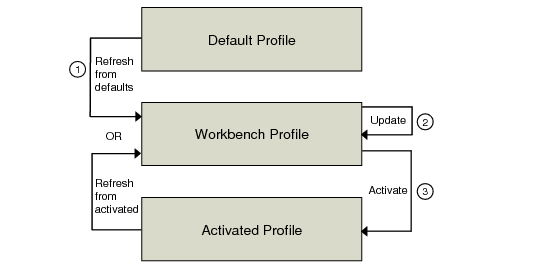
The life cycle of a profile consists of three phases:
• The QAD-provided default profile. Based on QAD-provided category data, this is loaded using E-Sig Initial Data Load (36.12.14.13) and serves as the template for profiles used by the system. You cannot update default profile records directly—only after you have copied them by refreshing the workbench profiles. See
Refreshing Signature Profiles.
Note: You can view the structure of default profiles without refreshing the workbench. Use E-Sig Workbench Profile Report (36.12.14.6) with Display Default Profile set to Yes.
• The workbench profile. This is initially based on the corresponding default profile for a given category. It is an intermediate working version used to tailor each profile for specific requirements. You can refresh it based on an existing activated profile or the default profile. Because the workbench profile has no effect on current system activities, you can continue to update it while the active version controls electronic signature processing. See
Updating Signature Profiles.
• The activated profile. This is the profile used by the system to control electronic signature processing. It is copied from the workbench profile during activation along with a begin date, and it stays in effect until the begin date of another active profile for the same category. See
Activating Electronic Signature Profiles.
Profile Flow summarizes the relationships between the three category profile types.
Profile Flow