Tables and Fields
The category profile includes a list of tables and fields that define the data to be signed in the corresponding signature-enabled programs. See
Updating Signature Profiles.
Each category profile includes one or more database tables and their corresponding set of fields. For example, the profile for category 0007, Transaction History, includes fields from the inventory transaction history table (tr_hist). In some cases, a category profile might include multiple tables where the records are related in a hierarchy of parent-child relationships. For example, a table might have associated child records in the transaction comments (cmt_det) table.
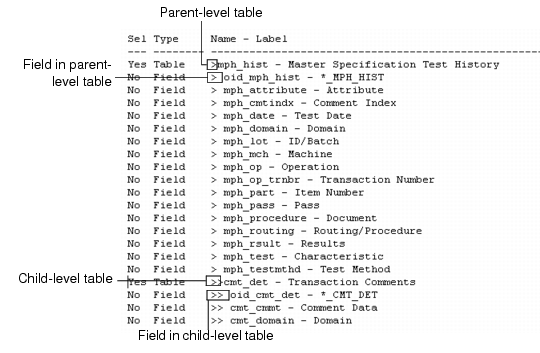
Greater-than symbols (>) and spaces show the hierarchical relationships among tables and fields on the list. Top-level tables are preceded by a single > symbol; fields within the table begin with a > symbol and a space. Tables with child relationships are designated with an additional > symbol; fields in child tables include the same number of > symbols as the corresponding tables, again with a space separator.
Example: Example of Workbench Profile Table/Field Structure shows a portion of the default profile structure for category 0002, Quality Results, which specifies the test results data to be signed in several programs in Shop Floor Control (menu 16.20). View default profiles using E-Sig Workbench Profile Report (36.12.14.6) with Display Default Profiles set to Yes.
Example of Workbench Profile Table/Field Structure
Top Tables
Each QAD-provided category definition includes a top-level table, which displays in the Top Table field in the first frame of E‑Sig Workbench Profile Maintenance. In most cases, this is the first table that appears in the profile structure.
In other cases, however, the top table is not included in the data to be signed but instead provides key values for identifying the signed data.
Example: The top table in the Quality Results category is the work order routing (wr_route) table, but this table is not included in the data to be signed; that consists of the master specification history (mph_hist) table and related transaction comments (cmt_det). The wr_route record is used only to identify the signed data by providing the context.
You can specify top-table field values to identify data that may have signatures attached; for example, use E-Signature History Report (36.12.5) to view signature history associated with a specific work order identified in the wr_route table. See
Electronic Signature Reports.