Application Document Repository
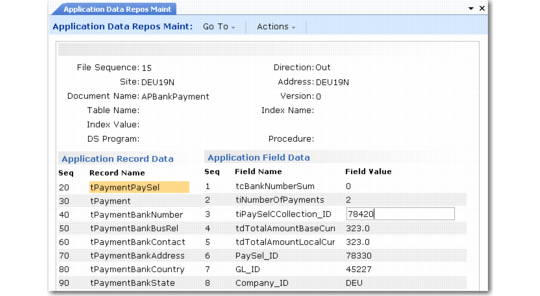
Use Application Data Repository Maint (35.9.10) to modify or add data to an imported or exported document. For instance, you can use the program to add missing data to a required field.
The application document repository includes two types of data:
• Outbound documents that have been transferred from the database with an export gateway but have not been transformed into an exchange file format
• Inbound documents consisting of transformed business document data that a gateway program has not transferred to the database
The repository stores all documents that pass through it during processing, whether or not they complete all the subsequent steps. These documents remain in the repository until they are archived and deleted. See
Archiving and Deleting EDI eCommerce Data.
Warning Any changes you make to data fields with this program do not update actual business documents—only the eCommerce repository tables. Changing repository data can lead to data synchronization problems. Use menu security to limit access to this program.
This program works the same way as Exchange Data Repository Maint (35.9.3). See
here.
Note: A .NET UI menu collection lets you select a repository record through a browse. You can view or update associated records in both repositories, as well as reprocess them after correcting problems, through a single UI. Its repository maintenance functionality is similar to this program. See
Maintain eCommerce Repository Data Collection.
Application Data Repository Maint (35.9.10)