Attribute Deviations - Sales
In IAQ, you can create the following item profiles that are specific to sales:
• Item Customer Profile. Applies to a specific item, customer, ship-to, and site combination.
• SO Line Profile. Applies to a specific sales order or scheduled order line.
Maintain Item Customer Profile
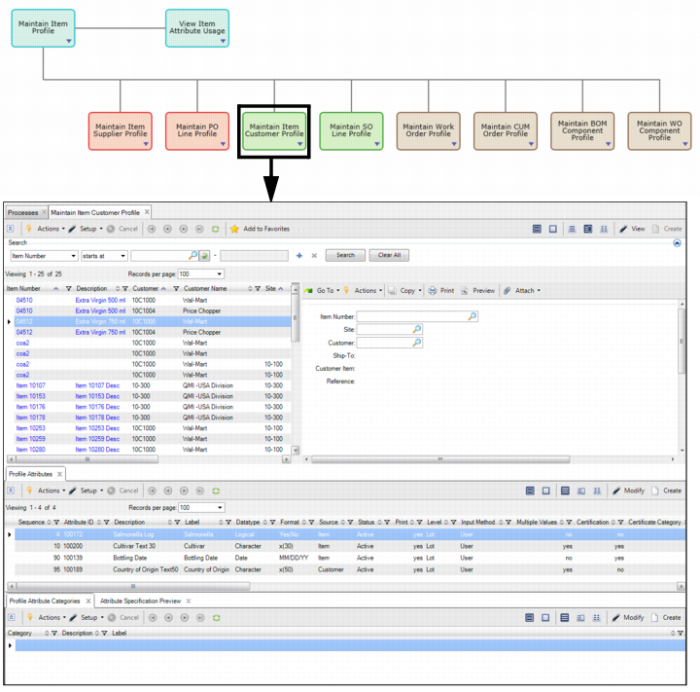
In the Maintain Item Customer Profile collection, you can create item customer profiles that allow you to track different attributes when dealing with a certain customers.
To access the item customer collection, select Maintain Item Customer Profile from the Manage Attribute Profile process map.
Maintain Item Customer Profile
The top browse of the Maintain Item Customer Profile collection contains the following fields:
Item Number
Enter or select the item number for the item customer profile.
Site
Optionally, enter or select the site associated with the item customer profile. Leave the Site field blank if you do not want to restrict the profile to a particular site.
Customer
Enter or select the sold-to customer associated with the item customer profile.
Ship-To
Optionally, enter or select the address code for the customer ship-to address that identifies where the items on the order should be delivered.
Customer Item
This field displays the customer’s item number that is associated with the item and customer.
Reference
Optionally, enter any reference information.
Creating a Deviation - Item Customer Profile
Follow these steps to create an item customer profile:
1 Select the Maintain Item Customer Profile collection from the Manage Attribute Profile process map.
2 To create a new profile, click Create.
3 In the top browse of the item customer profile collection, specify which item, site, ship-to, and customer are associated with the profile by entering the required information. For detailed field definitions, see
Maintain Item Customer Profile.
Maintain SO Line Profile
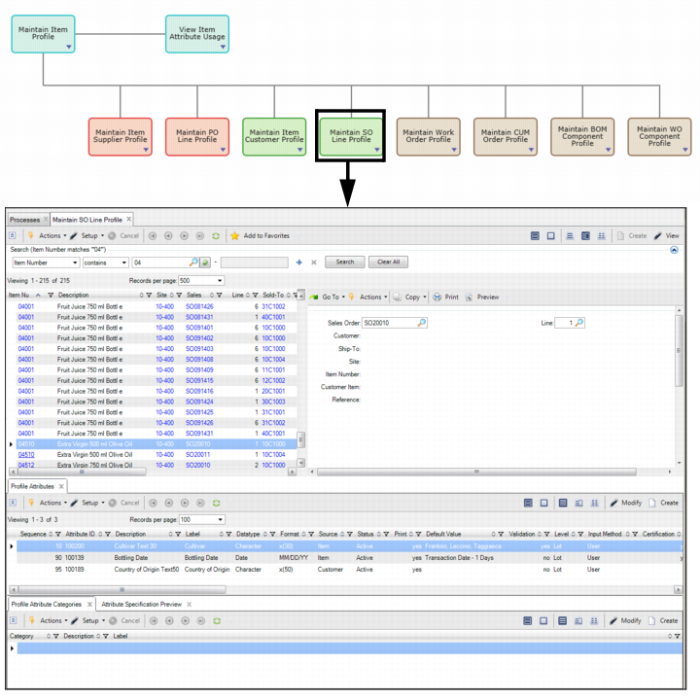
In the Maintain SO Line Profile collection, you can create SO line profiles that allow you to track different attributes associated with a specific SO or scheduled order line.
To access the SO line profile collection, select Maintain SO Line Profile from the Manage Attribute Profile process map.
Maintain SO Line Profile
The top browse in the Maintain SO Line Profile collection contains the following fields:
Sales Order
This field displays the SO number associated with the SO line profile.
Line
This field displays the SO line number associated with the SO line profile.
Customer
This field displays the sold-to customer associated with the profile.
Ship To
This field displays the address code for the customer ship-to address that identifies where the items on the order should be delivered.
Site
This field displays the site on the SO that is associated with the SO line profile.
Item Number
This field displays the item number on the SO line that is associated with the SO line profile.
Customer Item
This field displays the customer’s item number.
Reference
Optionally, enter any reference information.
Creating a Deviation - SO Line Profile
Follow these steps to create an SO line profile:
1 Select the Maintain SO Line Profile collection from the Manage Attribute Profile process map.
2 To create a new profile, click Create.
3 In the top browse of the SO line profile collection, specify which sales order and order line are associated with the profile by entering the required information. For detailed field definitions, see
Maintain SO Line Profile.
Attribute Layer Priority - Sales
When there are multiple item customer and so line profiles, some profiles will override other profiles. For example:
• What if there are multiple profiles for an item, item and customer, item, ship-to, and customer, as well as SO line?
• What if the same attribute appears with different default values at different levels?
• What if the same attribute appears with different specifications at different levels?
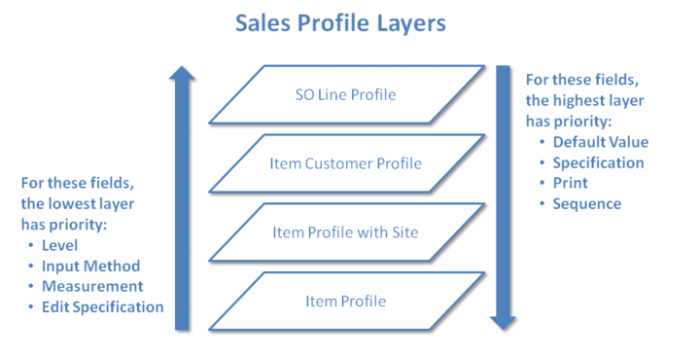
Each profile uses a different set of layers and priorities, which control how profile attributes override one another. The following graphic outlines the attribute layer priority for sales profiles:
Attribute Layer Priority - Sales
The sub-layers determine how different entries within a layer override one another. The sub-layers will not, however, allow a layer to override a higher layer.
• SO Line Profile
• Item and Customer Profile
• Item, Customer, and Site
• Item and Customer
• Item Profile
• Item and Site
• Item
Field priority functions in both directions, depending on the field. In the case of Default Value, Specification, Print, and Sequence, the highest layer has priority. The field value of the highest layer cascades down.
For the Level, Input Method, UM, and Edit Specification fields, the lowest layer has priority. The field value of the lowest layer cascades up.