View Item Attribute Usage
Use the View Item Attribute Usage collection to view attribute usage for purchasing, production, and sales. The top-level browse, which displays item attribute information, is organized by the associated business functions (purchasing, sales, and production). Select the Purchasing, Sales, or Production Attributes tabs to view if specific attributes are associated with specific purchase orders, sales orders, or work orders:
View Item Attribute Usage - Purchasing Attributes
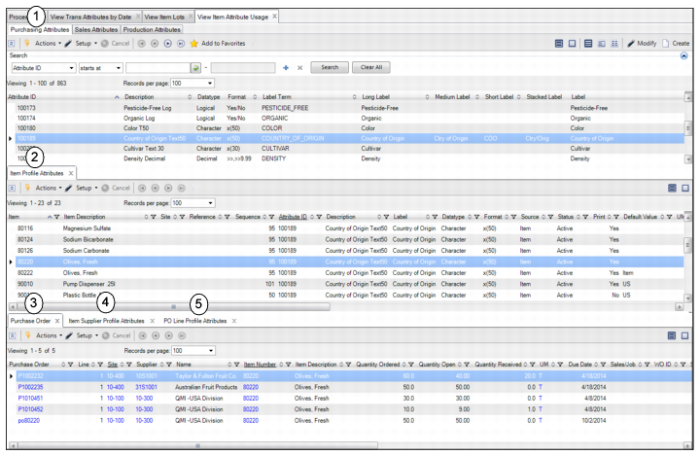
Select the Purchasing Attributes tab in the View Item Attribute Usage collection to view if specific item attributes are associated with purchase orders.
View Item Attribute Usage Collection
The Purchasing Attributes tab in the View Item Attribute Usage collection contains the following browses and tabs:
1 Item Attribute browse. Displays item attribute information, such as attribute ID, description, datatype, format, label term, and so on.
2 Item Profile Attributes tab. Displays the item profiles that are linked to the selected item attribute.
3 Purchase Order tab. If the selected item is added to any POs, this tab displays the purchase order information.
4 Item Supplier Profile Attributes tab. If there is an item supplier profile set up for the selected item, this tab displays the item and supplier information. For more information about setting up item supplier profiles, see
Maintain Item Supplier Profile.
5 PO Line Profile Attributes tab. If there is a PO line profile set up for the selected item, this tab displays the item and PO line information. For more information about setting up PO line profiles, see
Maintain PO Line Profile.
View Item Attribute Usage - Sales Attributes
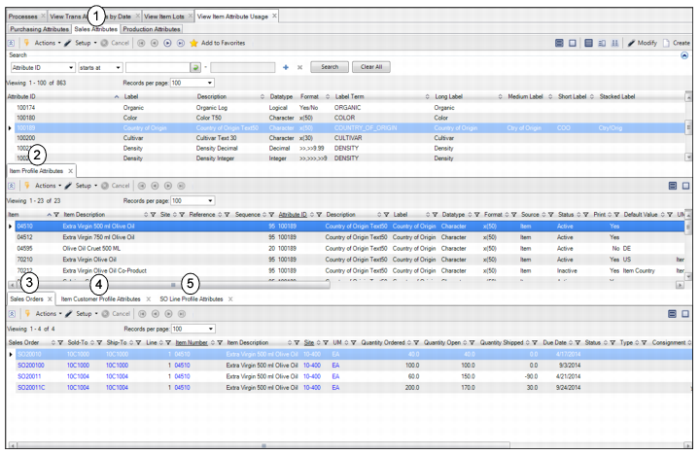
Select the Sales Attributes tab in the View Item Attribute Usage collection to view if specific item attributes are associated with sales orders.
View Item Attribute Usage Collection
The Sales Attributes tab in the View Item Attribute Usage collection contains the following browses and tabs:
1 Item Attribute browse. Displays item attribute information, such as attribute ID, description, datatype, format, label term, and so on.
2 Item Profile Attributes tab. Displays the item profiles that are linked to the selected item attribute.
3 Sales Order tab. If the selected item is added to any sales orders, this tab displays the sales order information.
4 Item Customer Profile Attributes tab. If there is an item customer profile set up for the selected item, this tab displays the item and supplier information. For more information about setting up item customer profiles, see
Creating a Deviation - Item Customer Profile.
5 SO Line Profile Attributes tab. If there is an SO line profile set up for the selected item, this tab displays the item and SO line information. For more information about setting up item SO line profiles, see
Creating a Deviation - SO Line Profile.
View Item Attribute Usage - Production Attributes
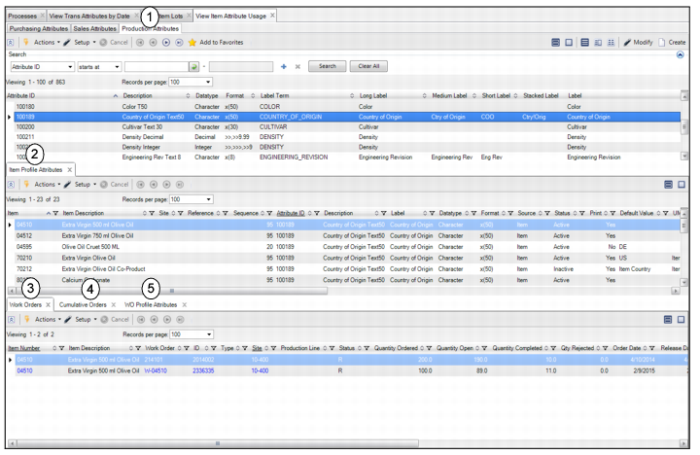
Select the Production Attributes tab in the View Item Attribute Usage collection to view if specific item attributes are associated with work orders.
View Item Attribute Usage Collection
The Production Attributes tab in the View Item Attribute Usage collection contains the following browses and tabs:
1 Item Attribute browse. Displays item attribute information, such as attribute ID, description, datatype, format, label term, and so on.
2 Item Profile Attributes tab. Displays the item profiles that are linked to the selected item attribute.
3 Work Orders tab. If the selected item is added to any work orders, this tab displays the work order information.
4 Cumulative Orders tab. If the selected item is added to any CUM orders, this tab displays the CUM order information.