Quality Orders and Customer Specifications
In the following business use cases, a user is shipping inventory to a customer that meets that customer’s specifications. In each of these use cases, it is assumed that the following have been created:
• A sales order for the customer and item.
• SO line and/or item customer profiles with attribute specifications that meet customer specifications.
Business Use Case 1: Ship Existing Inventory to Customer
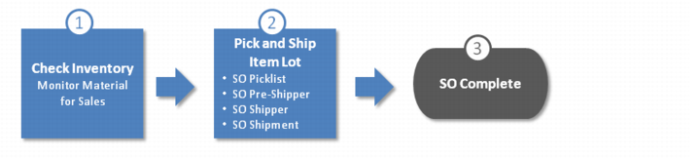
In this business user case, the user is shipping existing inventory, which conforms to customer specifications, to the customer.
Business Use Case 1: Ship Existing Inventory to Customer
1 Open the Monitor For Sales collection and check if there is inventory that conforms to customer specifications. See
Monitor Materials for Sales.
You verify that there are item lots in stock that conform to customer specifications and can be shipped immediately.
2 Pick and ship the item lots to the customer using transactions such as, SO picklist, SO pre-shipper, SO Shipper, SO Shipment, and so on.
During the picking and shipping transactions, the system verifies that all items conform to customer specifications.
3 Item lots are shipped to the customer and the sales order is complete.
Business Use Case 2: Retest Inventory to Conform to Customer Specifications
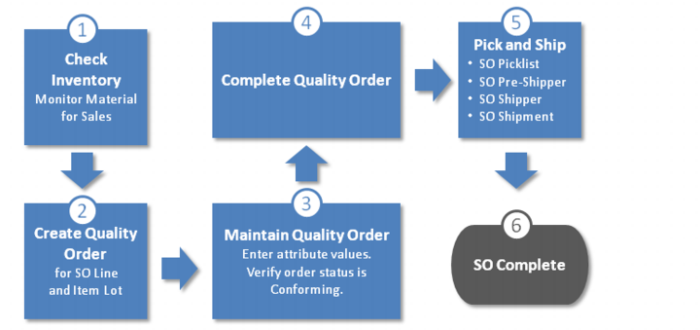
In this business user case, there is inventory to ship to customer but it needs to be re-tested to verify that it conforms to customer specifications.
Business Use Case 2: Retest Inventory to Meet Customer Specifications
1 Open the Monitor For Sales collection and check if there is inventory that conforms to customer specifications. See
Monitor Materials for Sales.
You verify that there are item lots in stock that need to re-tested before being shipped.
2 Manually create a quality order for the SO line and item lot. The customer specifications (attribute specifications) from the SO line and/or item customer profiles are added to the quality order. See
Manually Creating a Quality Order.
3 Retest the item lots and enter the attribute values. Verify the attribute values conform to customer specifications.
5 Pick and ship the item lots to the customer using transactions such as, SO picklist, SO pre-shipper, SO Shipper, SO Shipment, and so on.
During the picking and shipping transactions, the system verifies that all items conform to customer specifications.
6 Item lots are shipped to the customer and the sales order is complete.
Business Use Case 3: Build Inventory to Meet Customer Specifications
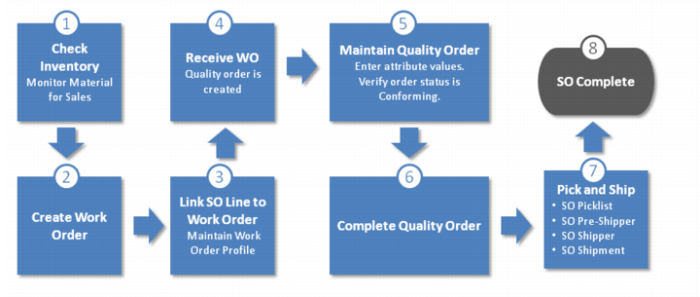
In this business user case, inventory needs to be built, which conforms to customer specifications, to be shipped to the customer.
Business Use Case 3: Build Inventory to Meet Customer Specifications
1 Open the Monitor For Sales collection and check if there is inventory that conforms to customer specifications. See
Monitor Materials for Sales.
You verify that there is no inventory in stock and that you need to build items that conform to customer specifications.
2 Create a work order.
4 After the items are built, receive the work order. The system automatically creates a quality order for the SO line and item lot. The customer specifications from the SO line and/or item customer profiles are added to the quality order.
5 Test the item lots and enter the attribute values. Verify the attribute values conform to customer specifications.
6 After the attribute values have been entered and the quality order is Conforming, complete the quality order. See
Completing Quality Orders.
7 Pick and ship the item lots to the customer using transactions such as, SO picklist, SO pre-shipper, SO Shipper, SO Shipment, and so on.
During the picking and shipping transactions, the system verifies that all items conform to customer specifications.
8 Item lots are shipped to the customer and the sales order is complete.