Time Zones and Engineer Scheduling
Multiple Time Zones has a significant impact on call scheduling options and on how the system interprets a call’s next status date and time.
• Use Engineer Maintenance (11.13.1) to associate a time zone with an engineer.
• You assign scheduling points in Engineer Schedule Control (11.13.15.24) based on matching time zones, either exactly or within a range.You can optionally limit engineers to consider for scheduling to those with time zones matching a call’s end user.
• Schedule times are either relative to the time zone of a call’s end user or relative to the time zone of the engineer, depending on Field Engineer in Engineer Maintenance.
• You must select a display time zone before generating most engineer reports and inquiries.
When you are using MTZ, you can choose how date and time information displays in most call reports and inquiries. The engineer’s time zone is one of the available choices.
See
Engineers and Scheduling for full details about scheduling options.
Engineer Maintenance (11.13.1)
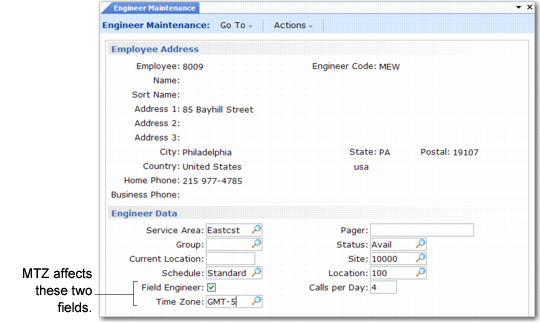
Use Engineer Maintenance (11.13.1), illustrated in
Engineer Maintenance (11.13.1), to define engineers.
Engineer Maintenance (11.13.1)
When MTZ is active, a Time Zone field displays and Field Engineer has a special significance. Time Zone defaults from the Domain Time Zone and is validated against time zones you create with Multiple Time Zones Maintenance.
The engineer’s time zone should reflect the time zone where the engineer is located. It is used in conjunction with Field Engineer, which indicates whether this engineer normally works at your site or at the end-user site.
• When Field Engineer is No, the system interprets the schedule times for this engineer relative to this time zone.
• When Field Engineer is Yes, the system interprets schedule times relative to the end user’s time zone.
The system considers the engineer time zone during call scheduling. It awards an engineer points according to Engineer Schedule Control if the engineer time zone matches the time zone of a call’s end user or is within the range of Range of Hours to Consider.
Engineer Assignment Maintenance (11.13.15.8)
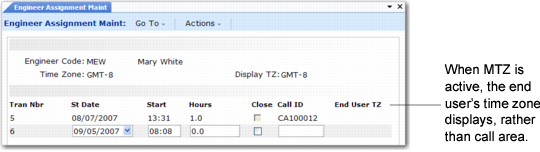
Call engineers use this function to maintain scheduling transactions created in Call Maintenance. When MTZ is active, the engineer’s time zone, labeled Time Zone, displays in the header frame. You select a display time zone from a pop-up list before you access transactions. The display time zone pop-up is discussed in detail on
here.
Your time zone selection appears in the header frame, labeled Display TZ. The system uses it to convert the scheduled start date and time of each record for display.
To provide a complete reference point, the time zone of the call’s end user also displays on the schedule detail line.
Engineer Assignment Maint (11.13.15.8)
Note: When MTZ is not active, the call’s area displays instead of the end user’s time zone.
Engineer Reports
Most engineer reports accommodate time-zone data.
Engineer Diary (11.13.15.9)
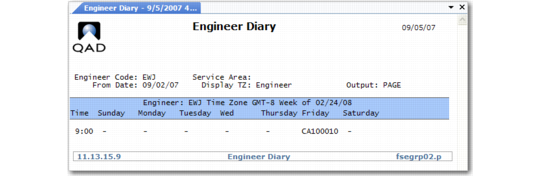
Engineer Diary displays the transactions created in Call Maintenance or in Engineer Assignment Maintenance. This report provides engineers with an overview of their call assignments for a week.
Engineer Diary (11.13.15.9)
When Multiple Time Zones is active, the dates and times in this inquiry are relative to a selected display time zone, which appears in the top frame labeled Display TZ.
The display time zone list does not include end user as a choice for this function, because output must be in one time zone, and the time zone of end users associated with calls can vary from call to call.
The title of the output frame includes the engineer’s time zone.
Note: If an engineer supports calls across time zones, use another display to review planned activity, since you cannot see the source of the call in this one.
Engineer Calendar (11.13.15.10)
This inquiry displays the normal work schedule for one or more engineers you select by engineer code, service area, problem and skill code, and date range. Its appearance does not change when MTZ is active, but if Field Engineer is Yes, the schedule time is relative to the end user on a call; if it is No, the schedule time is relative to the engineer’s time zone.
Engineer Availability Inquiry (11.13.15.11)
This inquiry simulates the availability information in Call Maintenance. When MTZ is active, like Call Maintenance, this simulation takes into account time zone matching.
The scheduling limits in Engineer Schedule Control affect this inquiry in the same way they affect Call Maintenance. If Override Scheduling Options is Yes in Engineer Schedule Control, the pop‑up displays where you can override the fields that limit the set of engineers to consider. When MTZ is active, Time Zone Points and Range of Hours to Consider display on the pop-up.
In the display time zone pop-up you can also select a time zone for displaying information from a limited number of choices. Since the system is not calculating availability for a particular call, the end user and assigned engineer are not valid choices.
The display time zone affects the way the system interprets availability. The system views schedule times for field engineers relative to the display time zone value. If Field Engineer is No, the system views the engineer’s schedule times relative to their personal time zone. Set the value of Field Engineer and Time Zone in Engineer Maintenance (11.13.1).
Example: You enter availability for 04/17/07 at 23:00. The display time zone is MST/MTD and Limit by Availability is Yes. Engineer Joe in Sydney, Australia normally works from 8:00 to 17:00. At 23:00 MST/MTD, it is 17:00 in Sydney. The system considers Joe available at 23:00 MST/MTD if Field Engineer is No for him, since schedule times are relative to his time zone. If he is a field engineer, the system interprets schedule times relative to the display time zone, and considers him unavailable.
The report output is identical to the output in the Engineer Availability frame in Call Maintenance, except it does not include the point totals.