Defining Limit Detail
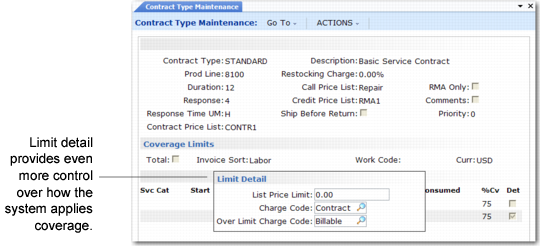
If you specify Yes to the Detail field when defining limits, an additional limit detail pop-up displays, as in
Limit Detail Pop‑Up.
Limit Detail Pop‑Up
The system searches for limit details in the same way it searches for limits. First it looks for a work code and service category combination, then for limits by invoice sort, and finally for limits in the Total = Yes record.
List Price Limits
A list price limit defines a ceiling on the price of individual items covered by the service type. When you specify an amount in List Price Limit and the list price of a particular item exceeds this amount in Call Activity Recording, the item is not covered even if limits have not yet been consumed. The system suggests the over‑limit charge code. If you use common limit detail for the limits on a service type, specify values for the Total = Yes record only to simplify data entry.
Note: Overriding the billable charge code has no effect on the covered amount for an item that exceeds the list price limit. The covered amount always defaults to zero, but you can change it.
Under-Limit Charge Code
You can associate two charge codes with each limit record: an under-limit and over-limit charge code. These charge codes direct financial impacts to charge product lines in Call Activity Recording. If you do not specify charge codes for detailed limits, the system looks for charge codes associated with the Total = Yes record. If none exist there, the system uses default charge codes defined with Default Charge Code Maintenance.
On a contract type, use a charge code with either contract or covered set to Yes for the under-limit charge code. Similarly, for a warranty, use a charge code with warranty or covered set to Yes.
However, use covered charge codes carefully. They are intended to indicate a generic coverage, such as that provided by the Default Call Service Type in Call Management Control. You can also set up generic service types for special purposes in call management.
Important: Never use the covered charge code on service types that form the basis of contracts and warranties.
Contract and Warranty Type Maintenance warns you that covered is reserved. Disregarding this warning can lead to confusion when you use the service type in Call Activity Recording.
Over-Limit Charge Code
The Over Limit Charge Code field determines the default charge code in Call Activity Recording when service costs exceed the service limit. Use a charge code with Billable set to Yes in Charge Code Maintenance.
When service charges exceed the limit, CAR switches to the over-limit charge code. If you do not associate an over-limit charge code with the limits, the system uses the billable charge code in Default Charge Code Maintenance instead. You can override the billable charge code with a giveaway charge code in particular instances in CAR.
Over-limit charge codes have an effect in two cases:
• On a contract with limit amounts. Charges accumulate against a limit amount only on a contract.
• On a contract or warranty if the coverage percent is zero. In this case, all service is over the limit.