QAD 2017 Enterprise Edition
>
User Guides
>
Service/Support Management
>
Using Pending Calls
>
Overview of Pending Calls
Overview of Pending Calls
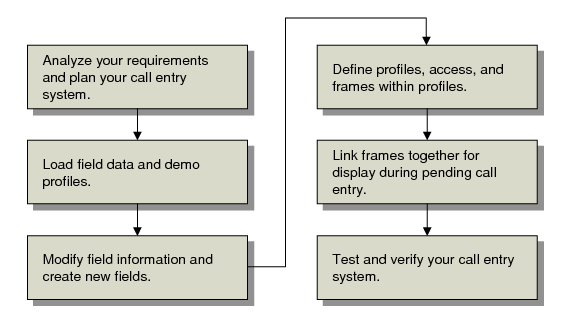
Pending Call Design Workflow illustrates a basic workflow for designing a pending call system.
Pending Call Design Workflow
To design a pending call system, follow these steps:
1 Plan your system by analyzing your business needs and the features of Call Maintenance that support them. For details, see
Planning a Pending Call System.
2 Load system data about fields you can use and load demonstration profiles. For details, see
Load System Data.
3 Modify field information if needed and add your own local variables for managing call entry. For details, see
Update Field Data.
4 Define profiles, give users access to them, and specify the frames and the fields on the frames within each profile. For details, see
Create Profiles.
5 Specify the sequence in which frames display for users in Pending Call Maintenance. For details, see
Link Frames for Display.
6 Test your call-entry system before releasing it to production use.