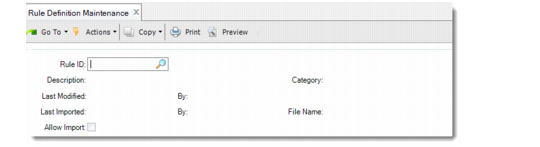
Rule Definition Maintenance
Several frames display in Rule Definition Maintenance to help you complete the validation setup. The following topics describe the frames.
Rule Fields Frame
After you enter a rule ID and other data in the header, the system displays the Rule Fields frame, which contains a list of fields and start effective dates that are attached to the rule. You can locate any field in the Rule Fields Frame and select it for update.
Field Detail Frame
If you select a field in the Rule Field frame to edit, or if you add a new field, the system displays the Field Detail frame. This frame displays fields that let you:
• Specify the name of the field.
• Optionally, enter a description.
• Enter the start date and, optionally, the end effective date.
• Specify whether the field applies to the shipper header, item, or container.
• Specify whether the field is a user or system field.
• Delete the field from the rule.
Prompt/Validation Locations
After you enter field detail data and click Next, the system displays the Prompt/Validation Locations Frame. In the frame, you specify whether the system provides validations, and if so, whether the validation is optional or required. You also specify whether the system prompts to enter values for user fields.
Note: You cannot control prompts for system fields.
Validation Detail Frame
You specify validations for a field in the Validation Detail frame. You specify validations for either system or user fields in this frame. Depending upon settings of certain fields and whether you are defining validations for a system or user field, additional frames can display.
Allowed Field Values and Manage Allowed Values Frames
If you set Allowed Field Values to Yes for a field in the Validation Detail Frame, the system displays the Allowed Field Values and Manage Allowed Values Frames. Use the frames to record field values.
If you specified a generalized code field in the Validation Detail frame, you can select from a list. If not, create values for the field.
When you exit the frame, the system returns you to the Validation Detail Frame.
Header Data
Ensure that you enter a Rule ID and other data about the rule in Rule Definition Maintenance before you can add new or existing shipper fields or create field validations.
Rule Definition Maintenance (7.9.11.1), Header
ID
Specify an identifier for this rule. You cannot leave this field blank; otherwise, an error displays.
Description
Optionally enter a description of the rule.
After you enter a description and press Go, the system displays the Rule Fields Frame with a list of fields attached to the rule and the Field Detail frame with the currently selected field.
Category
Optionally specify a category for this rule. Use categories to further organize and group rules.
Last Modified/By
These display-only fields show the date the rule was last modified and the user who modified it.
Last Imported/By
These display-only fields show the date the rule was last imported by centrally managed rule functionality and by whom. For information on centralized management of rules. See
Centralized Management of Validation Data.
Allow Import
Indicate whether system administrators can import rules that were exported from a centrally managed site. For information on centralized management of rules.