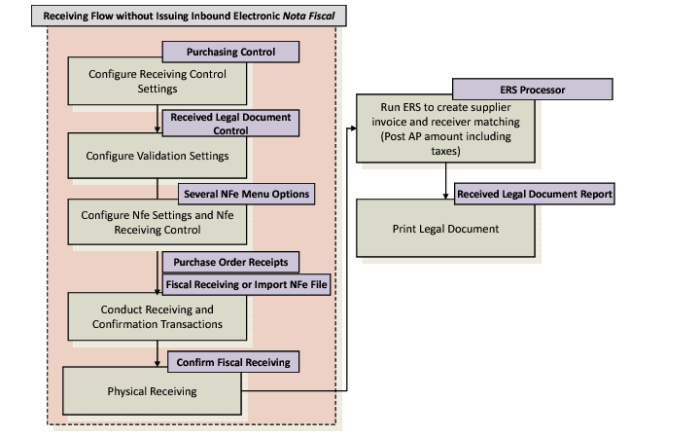
Receiving Flow Without Issuing an Inbound Electronic Nota Fiscal
Receiving Flow Without Issuing an Inbound Nota Fiscal
1 Set up the Purchasing Control and Received Legal Document Control settings for fiscal receiving as described in User Guide: QAD Purchasing.
4 Create a purchase order.
5 Complete fiscal receiving.
Alternatively, you can import the electronic
nota fiscal. See
Importing Electronic Notas Fiscais.
6 Complete the physical receiving process.
Note: You can also create PO shippers automatically through Fiscal Receiving. For more details, see
Automatic PO Shippers.
7 Confirm fiscal receiving.
8 Run the ERS Processor to integrate to accounts payable.
See User Guide: QAD Purchasing for more information on fiscal receiving and User Guide: QAD Financials for more information on the ERS Processor.