Maintaining Your Installed Base
Installed base data includes records of all items sold to customers who may be involved in future interactions with your organization. Items in the installed base may or may not be under warranty or service contracts.
An installed base record links three essential elements: an item, the customer who purchased it, and an end user. It also maintains details about an item, including serial number, installation date, warranty coverage, and how often preventive maintenance is required. Installed base records also include information about associated activities, customer service issues, opportunities arising from the installation, and so on.
Depending on your permissions you can view or update installed base records as required. You can add activities for installed base records, as well as associate them with opportunities and analysis codes. Opportunities automatically become available in the Opportunities module.
The Installed Base browser displays system records of your installed base. Select a record to view details.
1 From the application menu choose Customer Service|Installed Base. The Installed Base browser displays the installed base records currently defined in the system.
2 Right-click the Installed Base browser and choose Add or Edit from the menu. The Installed Base screen displays.
Details
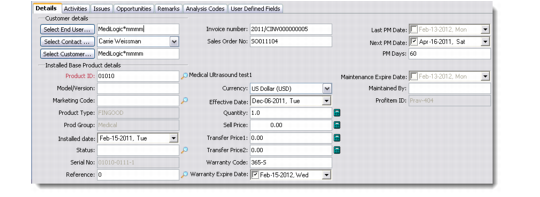
Use the Details tab to record contact information and product details relating to the installed product.
Installed Base - Details Tab
1 Enter customer details as required.
Select End User
Enter the end user for the product item.
For details on using the Find Profile/Contact browse, see
Searching Profiles and Contacts.
Select Contact
Enter the name of a contact from the end user.
Select Customer
Enter the name of the customer if the item was provided to the end user from a customer.
Contract No
Enter the number of the contract associated with the sale.
For details about maintaining contracts, see
Maintaining Service Contract Quotes.
Invoice Number
Enter the invoice number associated with the sale.
Sales Order No
Enter the sales order number associated with the sale.
Last PM Date
Enter the date on which preventive maintenance (PM) was last conducted.
Next PM Date
Enter the date on which PM will next be conducted.
PM Days
Enter the duration of the preventive maintenance cycle for this item in calendar days.
2 Enter details of the installed base product as required.
Product ID
Enter the ID of the product installed.
Model/Version
Enter a model number or version number of the product.
Marketing Code
Enter a marketing code associated with the installed product. This is a company-standard code used by marketing personnel.
Installed Date
Enter the date on which the product was installed.
Status
Enter a status associated with this product installation.
Serial No
Enter the serial number associated with the installed product.
Reference
Enter a reference number associated with this item.
Note: The combination of the serial number and reference number make the installed base record unique.
Currency
Enter the currency in which the sales transaction was conducted.
Effective Date
Enter the date on which the sale was effective.
Quantity
Enter the quantity of the product involved in the sale.
Sell Price
Enter the sale price of the installed product.
Transfer Price
Enter the transfer price for a location.
The transfer price is the price at which divisions of a company transact products with each other. Transfer prices are used when individual entities of a large organization are treated and measured as separately run entities.
For example, if your company manufacturers a product in one location and sends it to another location, the product price may differ between locations.
Transfer Price 2
Enter the transfer price for the second location.
This price will typically include taxes, packaging, and transport expenses.
Warranty Code
Enter the code for the product warranty.
Warranty Expire Code
Enter the date on which the warranty expires for the product.
Maintenance Expire Date
Enter the date on which the maintenance contract expires for the product.
Maintained By
Enter the name of the service person responsible for maintaining the product.
Activities
Use the Activities tab to record information about activities relating to the installed product. For example, you can schedule appointments to be held with profile contacts regarding this installation, such as telephone calls, letters, and e-mails.
To add an activity, right-click the Activities browser. Choose the Add option on the menu and select the type of activity you want to add. You can also select an activity from the Add an Activity drop-down menu on the application toolbar.
For information on adding activities, see
Adding Activities.
Issues
Use the Issues tab to manage information about customer service issues for the selected installed base record. To add a customer service issue record, click the Log a Support Issue button on the application toolbar.
For information on managing service issues, see
Viewing Customer Service Issues.
Opportunities
Use the Opportunities tab to record information about opportunities relating to the installed product. Right-click the text field on the Opportunities tab and choose Add to display the Opportunity Details screen.
For details on maintaining opportunities, see
Maintaining Opportunities.
Notes
Use the Notes tab to record pertinent freeform information relating to the installed product. You can enter text directly into the field on the Notes tab.
Analysis Codes
Use the Analysis Codes tab to filter installed base records according to their analysis code. Using analysis codes to filter records is useful when the list of installed base records is large.
User Defined Fields
Use the User Defined Fields tab to record information identified as being relevant to your organization’s business requirements.
Only a system administrator can create user-defined frames and fields through Settings|System|User-Defined Fields. For details on user-defined fields, refer to QAD Customer Relationship Management Administration Guide.