QAD Enterprise Asset Management 2017.1
>
User Guide
>
Projects
>
Jobs
>
Job Activities–All Job Types
Job Activities–All Job Types
You can perform the following activities for all job types:
Creating a Work Order from a Job
With EAM, you can create a work order from a job. When you create a WO from a job, EAM pulls in all the data from the job and automatically enters it into the WO. This feature saves you time and ensures data integrity. If a WO has been created from a job, the WO is directly tied to the job and the associated WO numbers appear in the Work Orders submenu.
To create a work order for a job, open the job. Select the Work Order submenu and click New. Enter information about the work order in the fields. See
Creating a Work Order.
Creating a Work Order and Reference a Job
If you create a work order and reference a job, the work order appears in the job’s Work Orders submenu. See
Creating a Work Order.
Attaching Existing Equipment to a Job
To attach an existing piece of equipment to a job, open the equipment record and reference the job from the Job No field. See
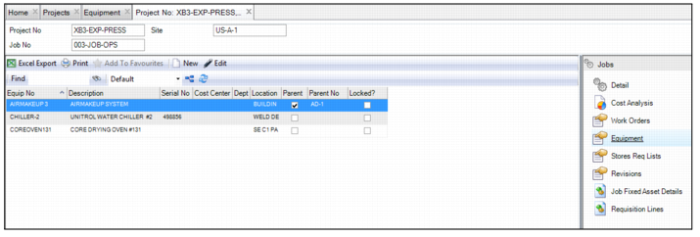
Equipment: Asset Tab. Any equipment that references the job appears in the job’s Equipment submenu.
Job: Equipment Submenu
Adding New Equipment to a Job
To create a piece of equipment for a job, open the job. Select the Equipment submenu, and click New. A blank equipment record opens. Enter the necessary information in the equipment record. See
Creating an Equipment Record.
Creating a Stores Requisition List for a Job
When you create a stores requisition list from a job, EAM pulls in all the data from the job and automatically enters it into the requisition list. This feature saves you time and ensures data integrity. If a requisition list has been created from a job, the list is directly tied to the job and the associated requisition list number appears in the Stores Req List submenu.
To create a stores requisition list for a job, open the job. Select the Stores Req List submenu and click New. Enter the information in the requisition list record. See
Creating a Stores Requisition List.
Reviewing Requisition Lines Associated with a Job
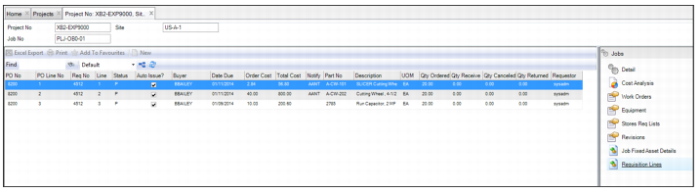
To review requisition lines associated with a job, open the job and select the Requisition Lines submenu.
Job Submenu: Requisition Lines
Reviewing Cost Analysis for a Job
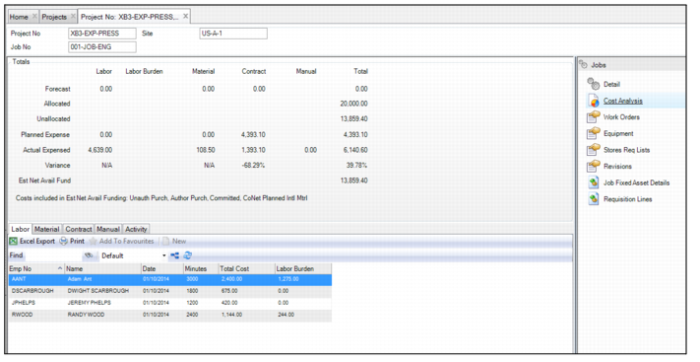
The Job Cost Analysis submenu allows you to view detailed cost analysis for an individual job. At a glance, you can see the forecasted, allocated, and unallocated costs for a job. You can also see the planned and actual expenses for the job. You can review cost summaries and totals, and by using tabbed pages you can find the details of those costs, such as labor postings, part issues, outside contractor charges, manual GL transactions, and expenses by job activities.
Cost analysis is updated with the Refresh action for the project. The action updates cost analysis amounts for both projects and jobs to reflect current balances and amount details.
Jobs Submenu: Cost Analysis
Cost Analysis Totals
Costs for labor, labor burden, manual, contract, and expense categories, plus a total of all these categories, are shown for each of the following items on the Cost Analysis summary screen:
• Forecast. The forecast costs for this job.
• Allocated. The total funding allocated to this job.
• Unallocated. The total not yet allocated for this job.
• Planned Expense. The planned expenses for this job.
• Actual Expense. The actual expense for this job.
• Variance. The difference between Planned Expense and Actual Expense.
• Est Net Avail Fund. The remaining funding available for this job as calculated by the cost categories shown in the Costs Included in Estimated Net Available Funding field.
• Costs included in Est Net Avail Fund. The categories selected in Site|Maintenance that are used to calculate the Estimated Net Available Funding.
Cost Analysis Tabs
The Cost Analysis submenu contains the following tabs:
• Labor. Detailed labor cost records.
• Material. Detailed material cost records.
• Contract. Contractor cost records.
• Manual. Manual GL records.
• Activity. Detailed activity cost records.