Posting Lines
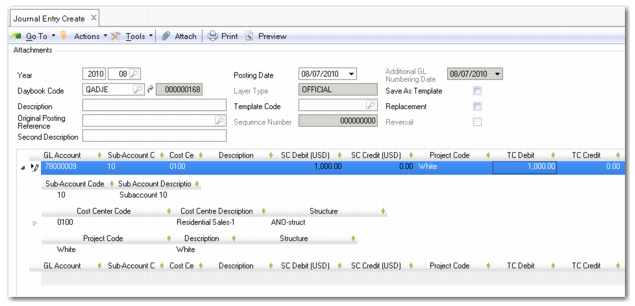
Define the transaction posting lines in the grid. A posting line can be composed of multiple sub-levels containing additional posting information.
The level 1 posting line contains fields for the GL account, sub-account, cost center, journal entry description, base currency, and debit and credit amounts in the base currency.
The posting grid can automatically display additional level 2 posting lines and fields, depending on how the GL accounts used in the transaction are defined, such as fields for:
• Transaction currency
• Quantity
• Intercompany
• Cost center analysis
• Project analysis
• SAF analysis
• Open items
• Tax account details
If the posting line contains additional level 2 posting lines, a line expander () appears to the left of the line:
Posting Line with Expander
Click on the line expander to view the level 2 posting lines.
If the GL account you use does not have analysis and the transaction you enter is in the base currency, the posting contains only a single line and no level 2 posting lines.
Journal Entry, Multiple Level 2 Posting Lines
Field Descriptions
GL Account
Specify a GL account code.
Description
This field displays a brief description of the posting line. This defaults from the header.
Currency
Specify the transaction currency code. If a currency has been defined for the GL account, the system loads it by default. If no currency is defined for the account, the system uses the domain base currency. The default accounting exchange rate is applied for multi-currency transactions.
See
Currency for details on entering values in a non-base currency.
For details on currencies and exchange rates, see
Currencies and
Exchange Rates.
Debit
Enter the debit amount for the transaction. The credit amount is set to zero when you enter a debit amount. The amount is displayed in the domain base currency.
Credit
Enter the credit amount for the transaction. The debit amount is set to zero when you enter a credit amount. The amount is displayed in the domain base currency.
Currency View
Choose Base Currency or Transaction Currency from the drop-down list to view the posting amounts in either currency.
Total
This read-only field displays the total of debit and credit amounts for the posting.