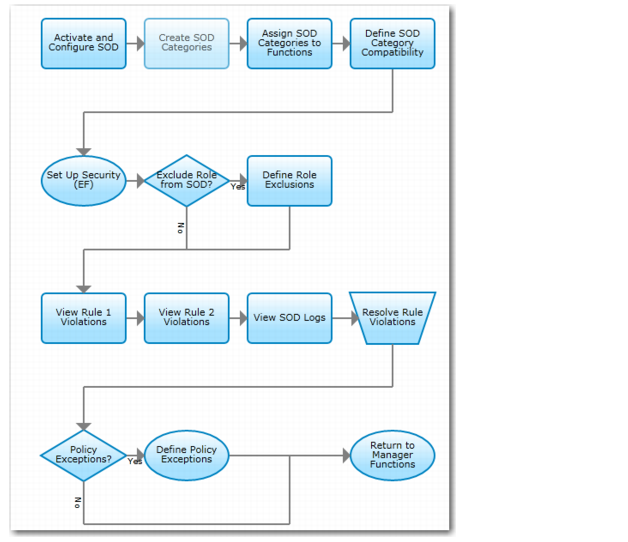
Segregation of Duties Process Workflow
Use the programs in the Segregation of Duties Menu to set up and configure segregation of duties functions.
Segregation of Duties Setup Flow illustrates one possible segregation of duties process workflow; use it to set up segregation of duties functions in your environment.
Segregation of Duties Setup Flow
The process of setting up segregation of duties incorporates several steps—defining role permissions and role membership, for example—that are required to configure a system regardless of whether segregation of duties is implemented. However, once application resources have been associated with a segregation of duties category, the role permissions that can be defined are constrained by your segregation of duties policy. For this reason, you should carefully consider the need to implement segregation of duties and plan accordingly. See
Planning a Segregation of Duties System. For details on planning and implementing security in your system, see
Implementation Summary.
After you create user records in User Maintenance (36.3.1) and define roles in your system in the Role function, the first activity is to activate segregation of duties using SOD Configuration (36.3.27.14) and specify segregation of duties configuration settings. See
Activating Segregation of Duties.
When segregation of duties is activated, you should then define the segregation of duties categories using SOD Category Create (36.3.27.1.1). For each category, you specify a unique category code and a description. See
Maintaining Segregation of Duties Categories.
After defining your segregation of duties categories, the next step is to associate an application resource with a segregation of duties category by using SOD Category Membership Maintain (36.3.27.4). See
Defining Role Permissions.
Use SOD Matrix Maintain (36.3.27.3) to define the segregation of duties categories that are mutually exclusive. Segregation of duties compatibility constraints are stored in the system as pairs in a segregation of duties category matrix. See
Maintaining the Segregation of Duties Matrix.
The next step is to define role permissions in your system. This associates application resources to user roles. See
Defining Role Permissions. This step is now constrained by the segregation of duties policy you have defined.
Next define your role membership. This step associates users with roles and—as with the previous step—is constrained by the defined segregation of duties policy.
If you implement segregation of duties in a new database and set up segregation of duties categories, compatibilities, and exclusions before setting up roles, segregation of duties would prevent you from assigning two incompatible roles to a user.
To allow for situations where a technical user account—for example, an integration user—needs access to all system functions, you can define roles that are exempt from segregation of duties rules using SOD Role Exclusion (36.3.27.8). See
Segregation of Duties Role Exclusions.
To accommodate situations—a staff shortage, for example—where a user might need to participate in more than one part of a business process, you can define segregation of duties policy exceptions by using SOD Policy Exception Create (36.3.27.2.1). See
Maintaining Segregation of Duties Policy Exceptions.
Use the SOD Violations report (36.3.27.9) and SOD Log Viewer (36.3.27.6) to view current segregation of duties policy violations and a violations history file, respectively. See
Reporting and Viewing Logs and Violations.
Segregation of duties violations that arise during segregation of duties maintenance are recorded in a log. Use SOD Log Archive (36.3.27.7) to archive log table records. See
Archiving Log Record Files.