Electronic Signatures Workflow
Use the programs on the E-Signature Setup Menu to set up and configure electronic signature functions.
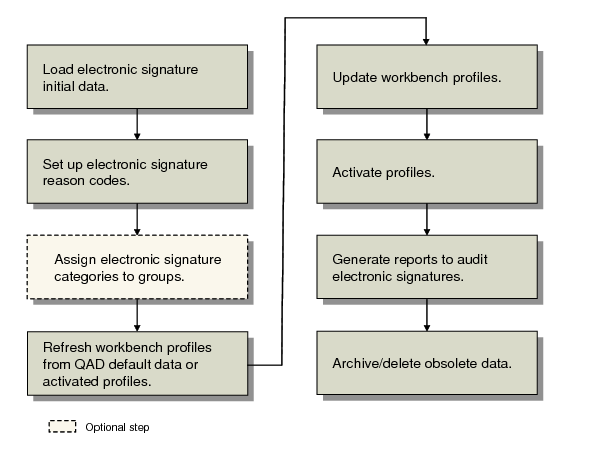
Electronic Signatures Setup Flow illustrates the electronic signature process workflow; use it to set up signature functions in your environment.
Electronic Signatures Setup Flow
Electronic Signatures Programs shows the programs available for setting up and reporting on electronic signature functions.
Electronic Signatures Programs
Menu Number | Description | Program Name |
36.12.4 | E-Signature Events Report | esevtrp.p |
36.12.5 | E-Signature History Report | eshstrp.p |
36.12.7 | E-Signature Failure Report | esflrp.p |
36.12.14.1 | E-Signature Group Maintenance | escgmt.p |
36.12.14.2 | E-Signature Group Report | esgrrp.p |
36.12.14.4 | E-Signature Workbench Refresh | eswpref.p |
36.12.14.5 | E-Sig Workbench Profile Maint | eswpmt.p |
36.12.14.6 | E-Sig Workbench Profile Report | eswprp.p |
36.12.14.8 | E-Signature Profile Activation | eswpact.p |
36.12.14.9 | Activated E-Sig Profile Report | esacrp.p |
36.12.14.11 | E-Sig Category Master Report | escatrp.p |
36.12.14.13 | E-Sig Initial Data Load | esinild.p |
36.12.14.21 | E-Sig Failure Archive/Delete | esesigup.p |
36.12.14.22 | E-Signature Archive/Delete | esesup.p |
36.12.14.23 | E-Signature Restore | esesld.p |
Before electronic signature processing can begin, the prerequisite planning and implementation steps must be completed:
• Planning steps include:
• Determine the types of data that need to be signed based on the regulatory requirements for your specific industry or environment.
• Determine how QAD Enterprise Applications fit into your overall business processes, as well as which specific electronic signatures support those processes.
• Complete data mapping requirements for records and available signatures.
• Determine security requirements for signed records; for example, assign appropriate role-based security to prevent users who should not sign records from accessing the programs that require signatures.
Note: Electronic signatures should be part of a detailed security plan to meet your overall business requirements.
• Implementation steps include:
• Define reason codes to explain the meaning of each signature.
• Optionally, define electronic signature groups to simplify the setup process.
• Load QAD-provided default signature profiles and modify them as needed, setting appropriate filter criteria.
• Activate the updated profiles.
The first activity in setting up electronic signature functions is to plan the extent to which you need to require signatures. Regulatory agencies are often specific about the types of data that must be signed, as well as the role of the signing individual—verifier, approver, and so on. Before you start the implementation, be sure that your signatures meet the needs of the appropriate regulatory agency. While the system offers a range of programs, tables, and fields that can be included in signature processing, you might not be required to implement more than a few.
A critical component of virtually any electronic signature is the signature meaning—whether the person applying the signature was approving, inspecting, reviewing, or so on. Reason codes provide the signature meaning. Be sure to plan and implement reason codes that make sense in your specific regulatory environment. See
here.
To avoid repetitive data entry for individual category profiles, create signature groups in E-Signature Group Maintenance (36.12.14.1). An electronic signature group is a group of category profiles that can be managed at the same time. A category is the definition of a set of
system data that can be signed as a unit. Creating an electronic signature group removes the requirement that each category profile must be refreshed or activated individually. When a group is refreshed or activated, profiles for all member categories are automatically updated. This saves time and can be used to organize categories into functionally similar groups. See
here.
To begin requiring electronic signatures, activate the profiles with E‑Signature Profile Activation (36.12.14.8). Activated profiles are staged to begin on a future date; signature recording does not occur immediately after a profile is activated. On the specified begin date, the system begins requiring and recording signature data as defined by each profile. See
here.
Use E-Signature Events Report (36.12.4) and E-Signature History Report (36.12.5) to view information that applies to electronic signatures. Use E‑Signature Failure Report (36.12.7) as part of your security program to identify potential unauthorized access attempts. See
here.