EDI eCommerce Processing
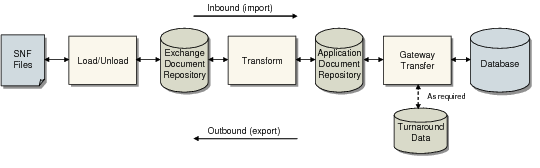
During import and export, the system stores data in repository tables based on table-resident exchange file definitions and trading-partner-specific implementation definitions of business documents. Then, it uses transformation definitions to determine the processing actions required to convert between the EDI-oriented exchange file and the system-oriented business document.
Most eCommerce processing is done at a programmatic level. Little system interface is required during day-to-day use.
Menu-level programs let you select documents for import and export processing, if necessary. Depending on how your system is set up, processing sometimes does not start from the user interface, as in the following cases.
• You can use Export/Import Controller (35.17.5) to set up a time-based process that searches for documents or files and automatically begins processing them. See
Scheduling Automatic Processing.
• The external EC subsystem can use a custom-written program to start inbound eCommerce processing when files are ready for import.
Three basic steps take place when you import or export a file with eCommerce: load/unload, transform, and gateway transfer. Each step moves data into or out of the repository.
Import/Export Process Steps summarizes the process.
Import/Export Process Steps
• Load/Unload
• The inbound process loads EDI data from the EC subsystem SNF files into the exchange file repository.
• The outbound process unloads data from the exchange file repository into the EC subsystem SNF files.
• Transform
• The inbound process transforms the documents from the EDI format into business document format, applying trading partner-specific logic to map fields appropriately.
• The same process is applied in reverse to outbound documents—business documents are transformed into EDI-oriented formats.
• Gateway transfer
• The inbound process extracts transformed documents from the repository and calls the appropriate gateway program to update the database.
• The outbound transfer process starts with the selection of a gateway program. Data is then placed in the document repository.
• The transfer process also stores trading partner-specific turnaround data on inbound messages. It retrieves stored turnaround data for outbound messages.
The import and export processes run automatically from beginning to end. If the system detects an error with a file or document at any time, it generates error messages and continues processing the rest of the job. Depending on where the error occurs, documents with errors are placed either in an error file or in the appropriate repository with a field indicating an error status. You can then use reporting tools to determine why errors occurred, then correct the problems and reprocess the documents.
Imports
The way import documents are processed and the way gateways are used to transfer data depends on the types of files loaded from the EC subsystem. A single menu program provides access to the documents available for import and allows you to select from a list of eligible files. The system reads control records in the SNF file to determine the document type, then selects the appropriate gateway processing program. All further processing is automatic.
You can also use the import function to load files from the EC subsystem directly into the application document repository. This feature lets you transform inbound files and export them again without ever creating business documents in the database.
The import process control flow is shown in
Document Import Process.
Document Import Process
Exports
Document export processing is similar to import processing at the user interface, with one exception. Instead of a single export program, there is a program for each type of document. You can enter selection criteria for the specific type of exported document.
These programs begin the process of extracting document data from the database and transforming it into a format that meets the requirements of the receiving trading partner.
The export process control flow is shown in
Document Export Process.
Document Export Process
The system can create optional tracking records for exported documents. After acknowledgment messages are imported from the EC subsystem, tracking records are automatically updated with status information from both the EC subsystem and the trading partner’s application.
Multiple Domains
You can use a single instance of eCommerce to import and export documents between multiple domains and the EC subsystem.
Multiple-Domain Processing describes how the system processes EDI transactions in a multi-domain environment.