Planning the Approval Process
Before starting to set up GRS, you should consider the way you want the approval process for your company to flow. Use the following questions as a guideline:
• Will you operate more efficiently if GRS generates e-mail messages to the people involved in the approval cycle?
• Should only the next approver be notified of approval-related events, or would a wider distribution be better?
• Are most of your requisitions approved by department heads or supervisors?
• Do you want to prohibit changes to an approved requisition?
• Are the types of purchases you make monitored across departments by certain reviewers, regardless of which department generates the requisition?
• Do you want the buyer to be able to change the cost specified on a requisition when placing a purchase order? And, if so, do you want to set parameters to identify a cost variance as out of tolerance?
System-Generated E‑Mail
One element to consider in the planning process is whether your company wants to use the automated e-mail notification features of GRS. If so, you must establish a record in E-mail Definition Maintenance (36.4.20) for each e-mail system your company uses. You must also enter e-mail addresses for all GRS users in User Maintenance (36.3.1).
If you decide to use automatic e-mail, you can send e-mail in regular or extended mode.
E-mail Modes summarizes GRS events and the resulting e‑mail recipients for these modes.
E-mail Modes
|
GRS event
|
Regular mode notifies:
|
Extended mode also notifies:
|
|
Route requisition
|
New route-to
|
Requested by, end user
|
|
Reverse route requisition
|
Current route-to
|
Requested by, end user
|
|
Modify or delete requisition
|
Current route-to
|
Requested by, end user
|
|
Mark out of tolerance
|
Requested by, end user
|
|
A system-generated e-mail message includes the following:
|
• Action
|
• Route to
|
|
• Requisition number
|
• Reason
|
|
• Requisition date
|
• Remarks
|
|
• Need date
|
• Approval status
|
|
• Due date
|
• Database
|
|
• Requested by
|
• Extended cost total
|
|
• Entered by
|
• Maximum extended cost total
|
|
• End user
|
• Approval comments (up to 15 lines)
|
Approver Types
Before you begin using the setup programs, consider how your company manages requisition approvals. GRS provides the flexibility to set up approvers based on the way your company wants to manage the approval process. You can set up four types of approvers—horizontal, vertical, job, and product line—using approver maintenance programs (5.2.1.13 through 5.2.1.16).
Once you have decided which types of approvers are best suited to the way you want to use GRS, you are ready to set up levels, categories, and jobs—the building blocks used to define approvers.
Note: Because GRS is flexible, you can change or add to the approver profiles at any time. For example, when you go through the initial setup process, your company might not need to use job approvers. However, later it may be convenient to isolate some purchase approval authority to a specific project. You can then define the job and add a job approver for it.
Horizontal Approvers
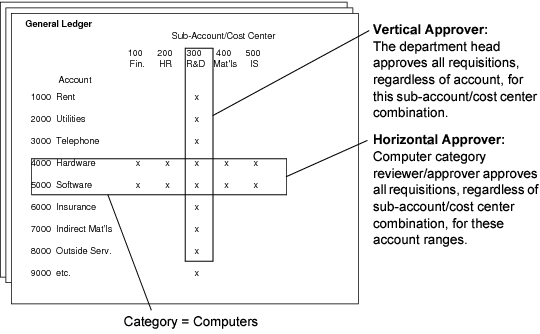
Approvers can be set up horizontally based on the categories of items they are approving. For example, one manager in your company might approve all computer purchases, regardless of which department creates the requisition. You use Category Maintenance (5.2.1.4) to assign a range of accounts to a category such as Computers. You can then require all computer requisitions to be sent to the approver named for this category, regardless of the requestor’s sub-account or department.
Vertical Approvers
Many companies approve purchases on a group or department basis. Normally, a department manager or supervisor approves requisitions for the department. If this is the way your company works, you can define approvers vertically through the organization; the approval levels can be related to combinations of entities, sub-accounts, and cost centers.
Even if you use vertical approvers, you might want to have someone else review specific types of purchases across all organizations to make sure purchases conform to company policy. Then, you can also define categories and set up horizontal approvers with different ranges of account authorizations.
Vertical versus Horizontal Approvers is a simplified overview of the difference between horizontal and vertical approvers. It also illustrates how a requisition might require both types of approval.
Vertical versus Horizontal Approvers
Job Approvers
Sometimes, you might need to set up projects or other relatively short-term tasks that do not require long-term approval authority. In this case, you can set up one person—usually the program manager—as a job approver.
This approver can authorize requisitions within specified ranges of sub‑accounts and cost centers—but only if the requisitions are associated with a specific job. This way, a single approver can authorize project‑specific purchases originated by several departments (multiple sub‑accounts).
Product Line Approvers
Product lines group items for reporting, planning, and accounting purposes. A product line approver authorizes inventory purchases for direct materials associated with specific sites and product lines. A person who approves MRP-planned material purchases must be defined as a product line approver.