Setting Up Approvers
GRS provides four programs for defining the approvers most appropriate to your company. These programs use combinations of the level, category, and job data you established earlier in the setup process, along with entity, sub-account, and cost center data, to define an approver profile.
See
Planning the Approval Process for information about approver types.
Use Approver Report (5.2.1.17; 5.2.1.41 for the enhanced .NET UI version) to view information on existing approvers.
This section describes the four GRS approver maintenance programs. These programs include many common fields. Descriptions of these fields are provided only once and are not repeated for each program.
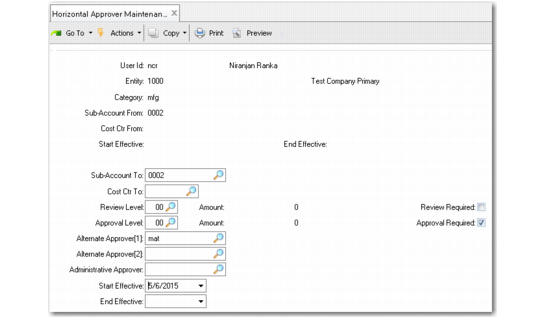
Horizontal Approver Maintenance (5.2.1.13)
User ID
Enter the ID of an individual assigned an expenditure authorization limit within a defined set of GL account, sub-account, cost center, and entity ranges. This can also be a reviewer—a person who may not have a high enough level to approve a purchase, but still reviews it from a policy or compliance standpoint.
Note: When you enter a valid value, the system displays the full description of the selected entry.
Entity
Enter the entity code for which an approver can authorize requisitions. Entity codes are used to process the GL transactions of a specific part of your company—an office or region, for example. Leave blank if this approver can authorize requisitions for all entities in the current domain.
Category
Enter the alphanumeric code for the selected category. This field applies to Horizontal Approver Maintenance only. See
here.
From Sub-Account and Cost Center
Specify the beginning of the range of sub-accounts and cost centers for which this approver is authorized to approve requisitions. If there are values in To Sub-Account and Cost Center, these fields cannot be blank.
To Sub-Account and Cost Center
Specify the end of the sub-account and cost center approval ranges. These default from the values in the From fields, if any. If there are values in From Sub‑Account and Cost Center, these fields cannot be blank.
Review Level
Enter the two-digit code representing the minimum amount of specified currency an individual is required to review on a requisition. This field is used with the Review Required field to indicate that this person must review all requisitions at or above the level shown here—even if the person’s approval authority is insufficient to make final approval.
Review Required
Enter Yes if all requisitions at or above the level specified in Review Level must be reviewed by this individual. Default is No. This applies only to requisitions requiring this person’s approval type—horizontal, vertical, job, or product line.
Approval Level
Enter the two-digit code representing the maximum amount of specified currency an individual is authorized to approve on a requisition.
The way GRS uses this level varies by the type of approver. For example, for vertical and job approvers, the system determines approvers based on the total maximum cost of the requisition. This is because all the line items use the same sub-account and cost center combination. For horizontal approvers, GRS selects approvers based on the total maximum cost of all the line items for each category included on the requisition. For product line approvers, GRS determines approvers based on the total value of requisition lines having the same site and product line (product line is specified in Item Data Maintenance). Note that the total requisition value is used only if the same site and product line apply to all requisition lines.
Approval Required
Enter Yes if all requisitions at or below the level specified in Approval Level must be approved by this individual. Default is No. This applies only to requisitions requiring this person’s approval type—horizontal, vertical, job, or product line.
Alternate Approver 1, Alternate Approver 2
Enter the ID of another approver with the same or greater expenditure authorization limit who is allowed to authorize requisitions on behalf of a regular approver when that person is not available. You can designate up to two alternate approvers. An alternate must be defined as the same type of approver as the primary.
Administrative Approver
Enter the ID of an individual authorized to approve purchase requisitions on behalf of this approver. Completing this field allows routine requisition activities to continue during a manager’s absence.
Important: The person specified should not be defined as an approver in any of the Approver Maintenance programs.
Start Effective
Enter the first date this approver is authorized to approve requisitions. The default is blank. Effective dates are optional; you can use start and end dates to assign approvers for short-term tasks or as temporary alternates.
End Effective
Enter the last date this approver is authorized to approve requisitions. The default is blank; effective period is open-ended.
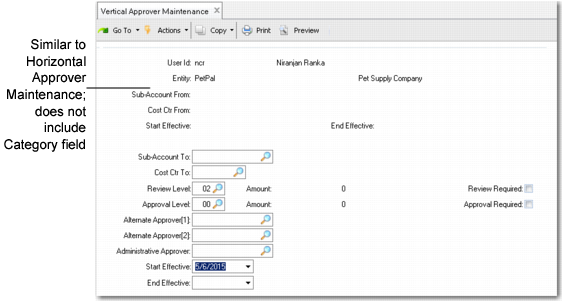
Vertical Approver Maintenance (5.2.1.14)
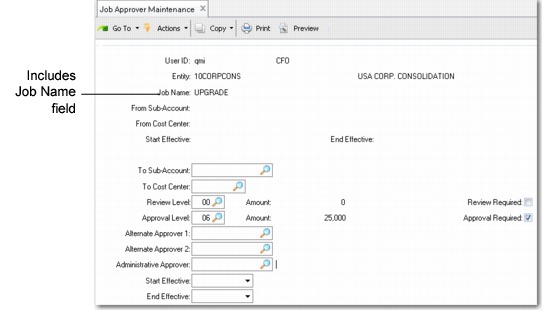
Job Approver Maintenance (5.2.1.15)
Job Name
The job code assigned to this project or activity. This field applies to Job Approver Maintenance only. See
Setting Up Jobs.
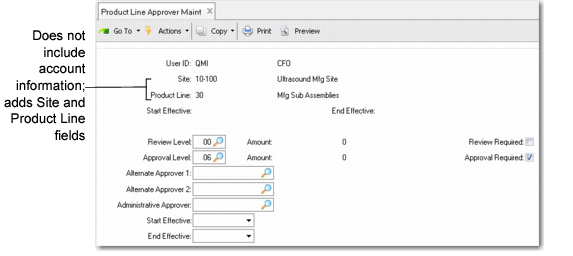
Product Line Approver Maintenance (5.2.1.16)
Site
Enter the site code for which this person is authorized to approve requisitions for inventory items. This field applies to Product Line Approver Maintenance only.
Product Line
Enter the code of the product line for which this person can approve requisitions. This field applies to Product Line Approver Maintenance only.