Modifying the Purchase Order
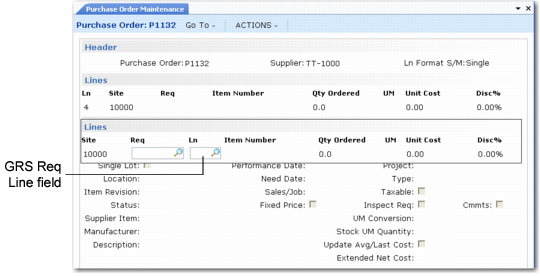
Use Purchase Order Maintenance (5.7) to make any changes required to the new purchase order and continue the purchasing process. When GRS is active, a requisition line field displays to accommodate the multiple-line requisitions built in GRS (see
Purchase Order Maintenance (5.7), Line Item Frame).
See
Creating Purchase Orders for details on Purchase Order Maintenance.
A lookup browse on the Req field lists the approved requisitions currently routed to Purchasing so that they can be added directly to the PO without using Build PO from Requisitions (5.2.18).
Purchase Order Maintenance (5.7), Line Item Frame
Out-of-Tolerance Conditions
Your company defines the way it wants to deal with out-of-tolerance conditions in Requisition Accounting Control (36.9.3). Two fields—Use Tolerance Value and Use Tolerance Percent—enable the system administrator to control if and how GRS calculates out of tolerance. Out-of-tolerance processing works only if one of those fields is set to Yes.
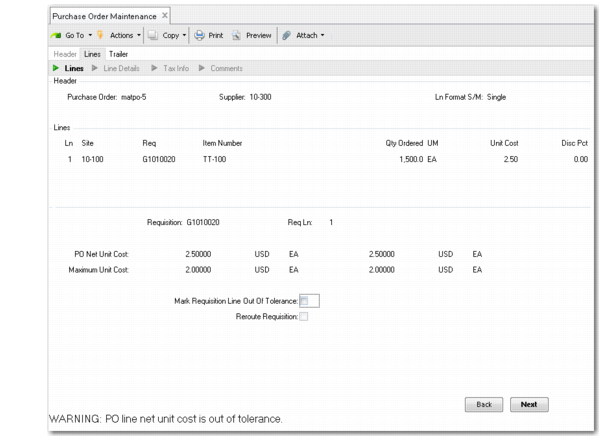
A requisition line becomes out of tolerance when it is being added to a PO if the buyer changes the Unit Cost field on the PO line to exceed the requisition maximum cost by more than the tolerance percent or tolerance value. When this happens, GRS displays the out-of-tolerance cost along with a Mark Requisition Line Out of Tolerance field.
Control settings for out of tolerance are described beginning on
here.
Note: This occurs only when the requisition line is being added to a PO in Build PO from Requisitions or Purchase Order Maintenance. On an existing line that references a requisition, Purchase Order Maintenance lets you update the cost within the tolerance parameters. However, if you attempt to change it to more than the specified tolerance, an error message displays.
Purchase Order Maintenance, Out-of-Tolerance Frame
If the buyer selects No, the cursor returns to the Unit Cost field—offering the buyer a chance to enter a lower value to bring the line back into tolerance. The line cannot be placed on a PO if its cost is higher than the maximum approved cost plus the tolerance value or percent, if one has been assigned.
When the buyer selects Yes, the cursor advances to the Reroute Requisition field. If the buyer sets the field to Yes, a Routing Maintenance screen appears. The Route To defaults from the setting in the Out of Tolerance Routing field in Requisition Accounting Control. The buyer can change this to any valid user. If the buyer chooses not to route the out-of-tolerance requisition at this time, it stays in the buyer’s queue.
Note: When the buyer marks a line out of tolerance, the Aprvl Status fields in the requisition header and the requisition line detail change from Approved to Out of Tolerance. If the requisition maximum cost is changed to bring the line back into tolerance, the status changes to Unapproved, and the requisition must repeat the approval process for that line before it can be placed on a purchase order. While the status is Out of Tolerance, the line can still be placed on a PO if the buyer enters a cost that is within the tolerance parameters.