QAD 2017 Enterprise Edition
>
User Guides
>
Service/Support Management
>
Service Contracts
>
Contracts for Items with End Users
Contracts for Items with End Users
To design a contract for items with end users, set Item End Users to Yes in the contract header.
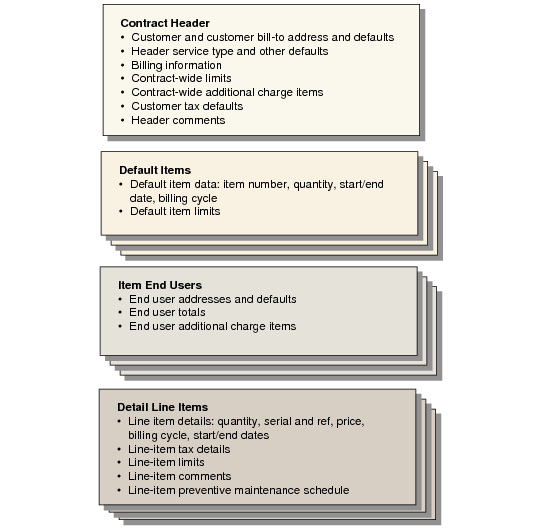
Contracts for Items with End Users illustrates the various levels of the contract and the components within each level.
Contracts for Items with End Users
The basic flow for contracts when Item End Users is Yes is the following:
1 Enter the contract header. Specify the contract type and other header defaults. When you complete the header, the contract is stored in the database even if you do not enter any line items.
2 If Contract Limits is Yes in SSM Accounting Control, optionally copy contract type limits to the contract header.
3 Enter header transaction comments.
4 Specify a default item on this contract and supply item default information.
5 If Contract Limits is Yes in SSM Accounting Control, optionally copy contract type or contract header limits to the default item.
6 Specify an end user who owns specific instances of this item and supply default end-user information.
7 Create detailed line items for this end user.
8 If Contract Limits is Yes in SSM Accounting Control, optionally copy contract type, contract header, or default item limits to the line.
9 Enter line-item comments.
10 View and modify item preventive maintenance (PM) schedule.
Repeat steps
7 through
10 until all instances of this item are added for this end user. Repeat lines
6 through
10 until all end users who own this item are added. Repeat steps
4 through
10 until all items are added to the contract.
11 If End User Additional Charges is Yes in SSM Accounting Control, specify end-user additional charges and any associated comments.
12 If End User Totals is Yes in SSM Accounting Control, view summary totals for this end user.
13 If Contract Additional Charges is Yes in SSM Accounting Control, specify contract-wide additional charges and any associated comments.
14 View contract totals and modify contract trailer information.
Use the following illustrations and field descriptions to understand the details of creating contracts for items with end users in Contract Maintenance (11.5.13.1).
This sequence of illustrations highlights only what is unique about creating a contract with Item End Users set to Yes. When the fields have the same effect as contracts for end users with items, refer to the previous field descriptions and discussions.
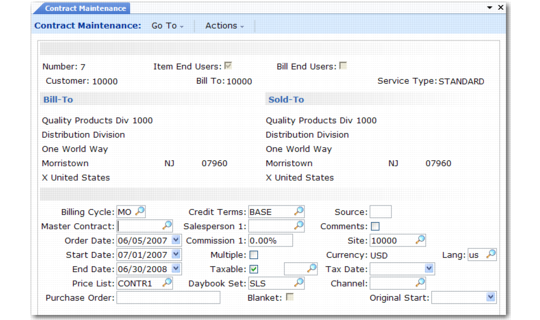
Contract Maintenance (11.5.13.1)
Contract Header
Set Item End Users to Yes to create a contract for items with end users. Other fields in the header are used in the same way as they are in a contract for end users with items.
One exception is the Blanket field. In item/end-user sequence, all lines on the contract have blanket coverage; you cannot change this value for an end user.
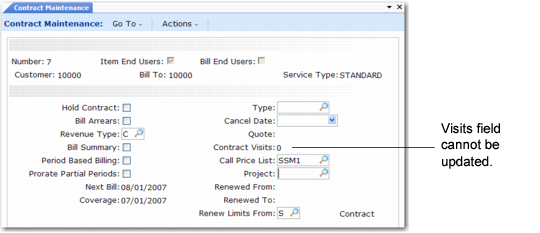
Second Header Frame
This frame is identical to the frame displayed in end-user/item sequence, except that you cannot update the Visits field. PM schedules exist only at the item level when Item End Users is Yes.
Contract Maintenance, Second Header
Header Coverage Limits
This frame is exactly the same as the header coverage limit frame in end-user/item sequence.
Item Default
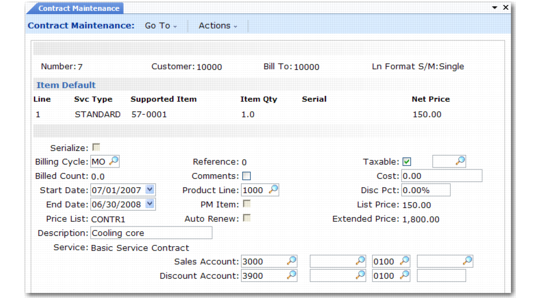
The Item Default frame displays next. This frame looks similar to the item detail frame, but you only specify limited information here, such as the item number and other attributes of the item that default to the specific item instances owned by each end user.
If you specified a source for items earlier, the system creates default item lines for the items you selected.
Item Default
In this frame, you cannot specify serial, serialize, reference, or PM item.
Item Default Coverage Limits
If Contract Limits is Yes in SSM Accounting Control, you are prompted to copy limits to the default item. If you previously copied limit detail into the contract header, you can copy default item limits from the header or the contract type.
This frame is exactly the same as the header coverage limit frame in end-user/item sequence.
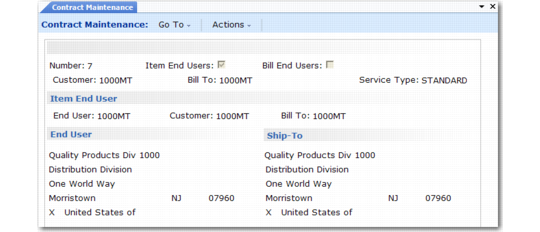
Item End User Address Frame
After completing header limits, you specify an end user who owns specific instances of the previously defined default item.
Item End User Address Frame
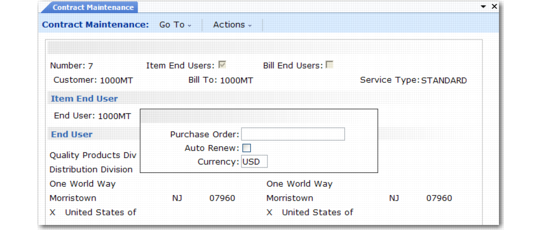
Item End User Defaults
Use this frame to modify defaults associated with the end user. In item/end-user sequence, you can modify only a few fields associated with the end user.
Item End User Defaults
Default values for the other fields not displayed in this pop-up either do not apply (blanket end user) or are set in the default item record (billing cycle, start and end dates, project).
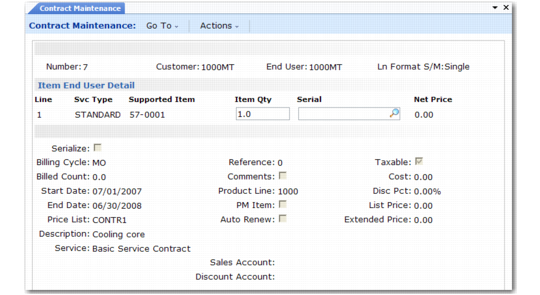
Item End User Detail
An end user can have multiple instances of the default item, each with a different service type. The line-item service type overrides the header service type. For example, specifying a different service type might bring in a different price list or change the level of coverage. If you change the service type, you are prompted to update the price from the new price list.
Item End User Detail
This frame is almost exactly the same as the item detail frame in end-user/item sequence. However, the Item field cannot be updated, since you are creating detail related to the default item you entered previously.
In this frame, you specify the values you could not specify in the default item frame: lot or serial numbers, reference numbers, and PM item. Serialize can be modified when you enter a quantity greater than 1 of lot or serial-number controlled items.
Preventive Maintenance Detail
If PM Item is Yes, a preventive maintenance detail pop-up displays. The default number of visits is always 0 (zero), since the header Visits field cannot be modified in this sequence. You can create a line-item schedule by specifying a number of visits in the pop-up.
Contract Accounts Pop-Up
If Display Contract Accounts is Yes in Contract Control, a pop-up window displays the Sales and Sales Discount accounts and cost centers being used and lets you modify them.
Item Detail Coverage Limits
If Contract Limits is Yes in SSM Accounting Control, the system again prompts you to copy service limits when you finish entering a detailed item. If you respond Yes, your choices depend on how you responded to previous prompts:
• If default item limits exist, you can copy from the default item or the service type.
• If default item limits do not exist and header limits do, you can copy from the header or the service type.
If you set up limits for the detail item, amounts accumulate against these limits, not the default item or contract header.
The limits frame is the same as the one used for contract header limits.
PM Schedules
If PM Item is Yes for the line item and you entered a nonzero value in the line-item Visits field, the PM Schedule for Line: n frame displays the scheduled dates.
Item End-User Iteration
After you add all instances of the default item for one end user, the Item End User frame redisplays so that you can associate another end user with this default item. If you have added all end users, click Back to continue.
Item Default Iteration
The Item Default frame redisplays so you can add another default item to the contract. If you have added all default items, click Back to continue.
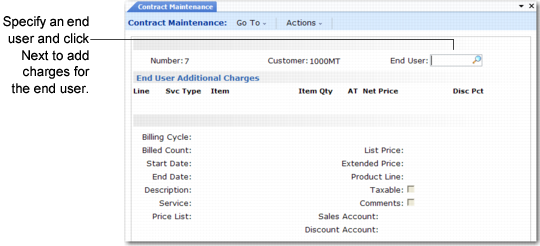
End User Additional Charges
If End User Additional Charges is Yes in SSM Accounting Control, you can associate additional charge items with each end user. These items are defined in Contract Additional Charges (11.5.7). Each charge is added as a separate line item with its own pricing information.
Adding additional charges in item/end-user sequence is similar to adding them in end-user/item sequence except that you must specify an end user before you can continue. After entering lines for one end user, you can specify a different end user and add more lines.
End User Additional Charges in Item/End-User Sequence
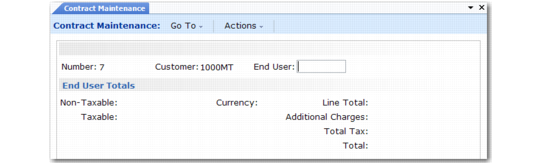
End User Total
If End User Totals is Yes in SSM Accounting Control, the following frame displays. As with the End User Additional Charges frame, you must first specify an end user before the summary information displays.
End User Total in Contract Maintenance
The fields in this frame are similar to those that display in the contract trailer, but apply to amounts for the current end user only.
Contract Additional Charges
If Contract Additional Charges is Yes in SSM Accounting Control, you can associate additional charge items with the contract. This frame is the same as the one that displays in end-user/item sequence.
Contract Trailer
The contract trailer in item/end-user sequence is the same as the trailer in end-user/item sequence.