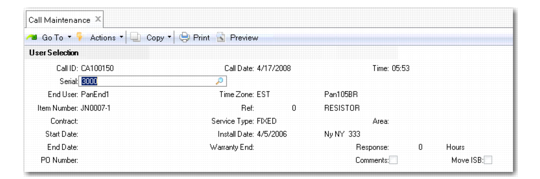
User Selection Frame
Use the user selection frame to specify or create the end user initiating the call and record the item and associated information. Once you enter an item, the system displays its warranty or service contract information. You can also record comments about the call.
User Selection Frame
Call ID
Enter a number or let the system generate one based on the call prefix and next call number in Call Management Control. Calls must have a unique prefix to distinguish them from quotes. The call ID identifies a call as it moves through its life cycle.
Note: If you are using classification codes for grouping items in the installed base, you are prompted to enter a classification code before you can enter a serial number. The system searches for matching serial numbers only within items that belong to this class. To search all items, choose Done without making a selection. See
Classifying ISB Records.
Serial
Enter the serial or lot number of the item being reported, if available. If the end user is calling about an item in the installed base, you can use this field to retrieve end user, item, and warranty information. If the item you enter in the Item field is defined as serial or lot-number controlled, a warning displays if you do not specify a number. The installed base cannot be updated until a number is provided.
End User
Enter the end user initiating this call. If specified, the end user must have been previously defined. If you want to select end users by attributes other than the code—such as phone number or zip code—leave this field blank to display an End User Selection frame. You can also create end users directly from Call Maintenance by leaving this field blank and answering Yes when prompted to create a new end user on the following frame.
A number of data elements associated with the call can default from the end-user record. These include: Area, Caller, Phone, Priority, Assigned, Escalation, Travel Distance, Travel Time, and Time Zone (if MTZ is active). The call scheduling sequence uses information associated with the end user to award points to engineers (area, primary and secondary engineer, and time zone). The end user also determines the customer and default bill-to addresses for Call Activity Recording and Call Invoice Recording.
Clicking Next with a blank End User field displays the End User Selection frame. Use this frame to find an appropriate end user record for the call.
If you are creating a call for an end user that already has other calls, the system prompts you to display these calls when you click Next. Selecting a call from this window replaces the call you were about to create. Use this feature to combine calls for the same end user.
You cannot change the end user associated with a call after you open reports in Call Activity Recording.
Item Number
Specify the number of the item requiring service. If the end user supplied an installed base serial number, the system fills in this field. If this item is in the installed base, it must belong to the end user entered previously.
Two control program settings affect the validation of this field.
• When Items Must Exist is Yes in Service Management Control, this field is validated against items defined in the item master. If Items in Installed Base is Yes, the item must also exist in the installed base before you can take a call for it.
• When System Level on Calls is Yes in Call Management Control, the next/previous processing in this field is affected. Only items in the installed base that have a system type that matches the system type specified for System Level in Service Management Control display.
If the item you enter has been set up in the item master as serial- controlled, a warning displays if you do not specify one. The installed base cannot be updated until a serial number is provided.
Ref
Specify an installed base reference number to uniquely identify this item. If you leave the Ref field blank or enter a question mark (?), the system suggests the next available reference number by scanning current ISB records.
Reference numbers are used in the installed base for non-serial controlled items to ensure the item identification is unique. The ISB reference should not be confused with the inventory reference number. While they both uniquely identify items, the ISB reference identifies items in the installed base; the inventory reference identifies items in inventory.
The Contract, Service Type, Start Date, Install Date, End Date, Warranty End, and Response fields default from any contract or warranty associated with the specified item/serial/ref combination or the standard coverage defined in Call Management Control. Area defaults from the end user.
PO Number
Specify a purchase order number for the service associated with this call. This field is required if the end user reporting the problem has been defined in End User Data Maintenance as requiring a purchase order. The field for the end user defaults, in turn, from the end user’s customer.
Comments
This field always defaults to No. Specify Yes if you want to enter comments immediately. This is especially useful if you are taking information directly over the phone. Specify No if you do not want to enter comments at this point. When comments are updated, the system adds a line displaying the current date, time, and user ID. You can enter comments at other points in Call Maintenance.
When MTZ is active, comment date and time display relative to the user’s time zone, if the user has defined a preferred time zone in Service/Support User Preferences.
ISB Move
Select the field and click the Next button to access the Installed Base Move frame. This frame lets you update the location of installed base items from one end user to another. See
Installed Base Move Frame.
Call Date, Time
These default to the current system date and time but can be changed during entry if you are recording a call taken earlier. The system uses the call open date in the search for valid coverage sources (warranty or contract), price lists, and service BOMs and routings.
If MTZ is active, call open date and time display relative to the end user’s time zone.