Inquiry
This section describes how you can configure the inquiry functionality using the System Value Setup page.
OverviewDescribes how to access the System Values functionality.
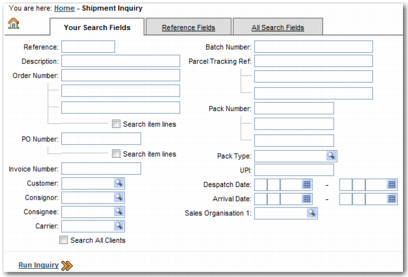
Search Page System ValuesDescribes the system values that control the appearance of the Inquiry search tabs.
View Results Page System ValuesDescribes the system values that control the appearance of the Inquiry View Results screen.
View Details Page System ValuesDescribes the system values that control the appearance of the Inquiry View Details screen.
Overview
Before configuring Inquiry, it is recommended that you read Base Web UI User Guide for a description of how the inquiry functionality works from a user perspective. As an administrator, you can configure the appearance of the Inquiry screens, including the fields that appear on each tab and the appearance of results pages. This enables you to set up Inquiry to suit the needs of your organization.
To configure the Inquiry screen, you must edit the relevant system values. This section assumes that you are familiar with the concept of system values and you know how to access them. For more information, read
System Values. For a full list of the Inquiry system values, refer to the Inquiry tab of
Appendix A on the QAD Document Library.
Inquiry is used as a verification and look-up tool that you access from other parts of the Web UI. To create a link to the Inquiry page from elsewhere in the Web UI, use one of the following URLs:
• http://[SERVER_NUMBER]:[PORT_NUMBER]/precision/jsp/trade/inquiry.jsp?view=default.
This opens the Inquiry page with only the configured Search Fields tabs visible.
• http://[SERVER_NUMBER]:[PORT_NUMBER]/precision/jsp/trade/inquiry.jsp?view=tab_ref.
This opens the Inquiry page with the Your Search Fields, Reference Fields, and All Search Fields visible, with the Your Search Fields tab selected.
• http://[SERVER_NUMBER]:[PORT_NUMBER]/precision/jsp/trade/inquiry.jsp?view=tab_all.
This opens the Inquiry page with the Your Search Fields, Reference Fields, and All Search Fields visible, with the Reference Fields tab selected.
• http://[SERVER_NUMBER]:[PORT_NUMBER]/precision/jsp/trade/inquiry.jsp?view=tab_1. This opens the Inquiry page with the Your Search Fields, Reference Fields, and All Search Fields visible, with the All Search Fields tab selected.
Inquiry Search Tabs