Exporting Level Mix Workbench Data
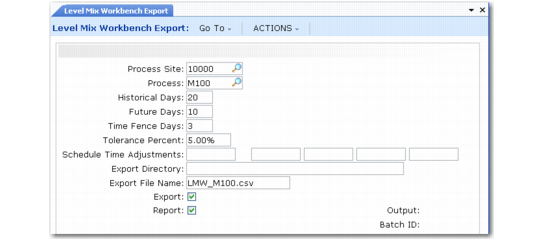
Use Level Mix Workbench Export (17.14.19) to generate a data file containing records that you can use with an external application to analyze the historical and projected product mix required in your pacemaker processes. You can use the exported data to generate level schedules based on the product mix as well as to create or update flow schedules to support the level schedules.
Level Mix Workbench Export (17.14.19)
Use Site and Process to identify a unique kanban process. Both fields are required.
Note: The system exports data for a process only when the following are true for the process record in Kanban Process Maintenance:
If one of these conditions is not met, the system displays an error message.
Several fields in the program are the same as in Kanban Workbench Export. See
Exporting Kanban Workbench Data.
Unique fields include the following:
Historical Days
Enter the number of days of historical data the system should use in average mix percentage calculations.
Future Days
Enter the number of days the system should use in selecting future demand records for export.
This value must be greater than 0 (zero) and greater than the value entered in Time Fence Days.
Time Fence Days
Enter the number of calendar days into the future, starting from today, when flow scheduled orders are considered frozen. This value defaults from Kanban Control. It is included in the export file.
This must be less than the value entered in Future Days.
Tolerance Percent
Specify the allowable tolerance percentage between the total amount planned to be scheduled and the total amount actually scheduled. This value defaults from Kanban Control. It is included in the export file.
Schedule Time Adjustments
Optionally enter up to five reference codes related to calendar adjustments specified in Process Calendar Except Maint (17.1.14). The system validates entries against that program. See
Set Up Process Shifts.
These fields default from Kanban Control.
The reference codes and the associated time adjustments are included in the export file.
Time adjustments are typically used to identify such exceptions to the standard shift calendar as holidays or irregularly scheduled meetings that cannot be accounted for by shortening the shift hours.
Record Selection
The system uses the following rules in determining data to be included in the export file:
• If no future forecast data is found for any items in the form of mrp_det records, average demand is used to determine future demand values. The current date is used to determine the past and future amounts. See
Daily Demand.
• Flow orders entered using Flow Schedule Maintenance (17.13.3) are analyzed to find orders matching the site, production line, and item with a due date within the Future Days range. The export file includes data from matching flow schedule detail (flsd_det) records. See
Using Flow Schedule Maintenance.
Note: The production line specified in Kanban Process Maintenance must match the flow schedule.
If the item in the flow schedule has a different unit of measure than the pitch UM defined in Kanban Process Maintenance, the system converts quantities to the pitch UM before creating the export file.
When you use both Kanban and Flow Scheduling, you should ensure that flow orders are in kanban quantity increments. The actual flow order quantity amount (converted to the process UM if needed) is included in the export file. If this is not in the correct pitch increment, the system displays an error message.
• The system does not select the following flow orders:
• Orders posted to repetitive
• Closed orders
• Fully completed orders
• Orders that have a work order number specified in Flow Schedule Maintenance
Level Mix Workbench Export and Import File Definition shows the structure of the export file created by Level Mix Workbench Export, as well as the structure needed when you return revised data to the system using an import file. The values in the fields are the same as those the system loads into Level Mix Workbench. See
here for information on Level Mix Workbench.
The file includes four different record types:
• H: A header record
• P: Records to hold mix analysis data by item
• D: Records to hold date and shift
• Q: Records to hold order quantity data by date, shift, and item
The record type is in the first position of each record.
The export file includes placeholders for updated fields that will be returned to the system for import after processing by the external application. The table shows those fields in italics.
Level Mix Workbench Export and Import File Definition
Field Name | Format | Description |
RECORD TYPE “H” | | |
record_type | character | H |
zero_constant | integer | 0 |
site | character | Site of the process |
process_id | character | Process |
production_line | character | Production line for process. Any flow orders imported or exported must reference this production line. |
hist_work_days | integer | Number of historical days to use to determine average demand |
fut_work_days | integer | Number of future days used to calculate average demand |
time_fence | integer | Number of days (from today) considered frozen. Flow orders in frozen dates can be changed, but will not be replanned by the workbench recalculation logic. |
pitch_quantity | decimal | Pitch size for the process |
pitch_um | character | Pitch unit of measure |
tolerance_pct | decimal | Difference between total modified orders and total planned orders that will generate a warning message |
epei_disp | integer | Indicates how EPEI displays (weeks, days, hours, minutes, etc.) |
cycle_time_sec | integer | Cycle time in seconds for the process |
time_adj1 | character | Shift adjustment reference code |
time_adj2 | character | Shift adjustment reference code |
time_adj3 | character | Shift adjustment reference code |
time_adj4 | character | Shift adjustment reference code |
time_adj5 | character | Shift adjustment reference code |
days_per_period | integer | For future use. Currently always set to 1. |
takt_time_revised | decimal | New takt time as a result of order modifications (to be posted to process record) |
RECORD TYPE “P” | | |
record_type | character | P |
zero_constant | integer | 0 |
part | character | Item number |
epei_disp_amt | decimal | EPEI converted to the desired display format |
hist_demand | decimal | Total historical demand |
fut_demand | decimal | Total future demand |
kanban_quantity | decimal | Kanban quantity |
cycle_time_sec | integer | Cycle time for item in seconds |
epei_sec | integer | EPEI for item in seconds |
seq_nbr | integer | Used to determine the order in which items are to be considered when being planned |
seq_work | integer | Work field used to determine sequence number |
mfg_seq | integer | User-defined manufacturing sequence number for this item |
req_operators | decimal | User-defined required number of operators |
knb_keyid | decimal | Kanban Loop ID: Internal keyid of knb_mstr record exported from the system |
max_buffer | decimal | Maximum buffer size for loop |
buf_adj_revised | decimal | User-entered change to maximum buffer size (can be positive or negative number) |
RECORD TYPE “D” | | |
record_type | character | D |
shift | integer | Shift |
date | date | Date |
day_of_week | character | Monday, Tuesday, etc. |
days_in_period | integer | Number of days in period |
total_hours | decimal | Total work hours available in shift |
time_adj_amt1 | decimal | Time adjustments for adj category 1 |
time_adj_amt2 | decimal | Time adjustments for adj category 2 |
time_adj_amt3 | decimal | Time adjustments for adj category 3 |
time_adj_amt4 | decimal | Time adjustments for adj category 4 |
time_adj_amt5 | decimal | Time adjustments for adj category 5 |
time_adj_amt_other | decimal | Time adjustments for all other adj categories |
avail_hours | decimal | Total hours in shift less all adjustments |
frozen | Yes/No | Indicates if this is a date within the time fence horizon |
time_adj_amt1_revised | decimal | User-entered amount for adjustment category 1 |
time_adj_amt2_revised | decimal | User-entered amount for adjustment category 2 |
time_adj_amt3_revised | decimal | User-entered amount for adjustment category 3 |
time_adj_amt4_revised | decimal | User-entered amount for adjustment category 4 |
time_adj_amt5_revised | decimal | User-entered amount for adjustment category 5 |
RECORD TYPE “Q” | | |
record_type | character | Q |
shift | integer | Shift (1 through 4) |
date | date | Flow order date |
part | character | Flow order item |
ord_qty | decimal | Flow original order quantity |
comp_qty | decimal | Flow quantity completed so far |
wb_qty | decimal | Calculated value of ord_qty – comp_qty |
frozen | Yes/No | Indicates if flow order is within the time fence horizon |
seq_nbr | integer | Flow order sequence number |
order_qty_revised | decimal | Revised quantity entered by user. If zero found and flow order exists, it will be deleted. |
|