 Forums
Message Boards
Delete records through CIM
Edward Visser, modified 3 Years ago.
Delete records through CIM
Post Date: 9/13/17 (Silver, 44 Posts) Recent PostsHi,
I'm trying to delete a pt_mstr-record by using a cim.
Loading a record succeeds with :
@@batchload ppptmt04.p
910055
"CO" "test 1618" ""
40 05/09/17 07805211 060912 "V" "KPCALC" "1135" "" "" "nvt" "" "" X
@@end
Now I'd like to delete the record and tried without success :
@@batchload ppptmt04.p
@DELETE
910055
"CO" "test 1618" ""
40 05/09/17 07805211 060912 "V" "KPCALC" "1135" "" "" "nvt" "" "" X
@@end
Also no success :
@@batchload ppptmt04.p
@ACTIONDELETE
910055
"CO" "test 1618" ""
40 05/09/17 07805211 060912 "V" "KPCALC" "1135" "" "" "nvt" "" "" X
@@end
With this one a dialogue is started and I have to put in the item no. manually.
Tried several more option, but all without any succes.
Your help is very much appreciated....
Kind regards,
Edward

Raymond Chin Kwie Joe, modified 8 Years ago.
Re: Delete records through CIM
Post Date: 9/13/17 (Rhodium, 825 Posts) Recent PostsTo delete items there is a special menu. (36.25.10, ppptmt05.p)
Be carefull, it is a very powerfull menu! Check the system help.

Edward Visser, modified 8 Years ago.
Re: Delete records through CIM
Post Date: 9/13/17 (Silver, 44 Posts) Recent PostsHi Raymond,
Thanks very much for this very quick response.
Luckily I have a test environment where I can play around, so I guess I'll find out how to work with this.
Kind regards,
Edward

Phill Norrey, modified 8 Years ago.
Re: Delete records through CIM
Post Date: 9/15/17 (Yoda, 1010 Posts) Recent PostsEdward Visser, modified 8 Years ago.
Re: Delete records through CIM
Post Date: 9/17/17 (Silver, 44 Posts) Recent PostsOkay, no time to try it yet, but that's not a problem.
I just was searching for a way to get rid of the items while still using the mfg logic. I already have a query with which I inventory with which tables an item still has relations. If it finds no relations it is stated that the item can be deleted.
Phill Norrey, modified 8 Years ago.
Re: Delete records through CIM
Post Date: 9/18/17 (Yoda, 1010 Posts) Recent Posts
Phill Norrey, modified 8 Years ago.
Re: Delete records through CIM
Post Date: 9/18/17 (Yoda, 1010 Posts) Recent PostsAnother option is if the program has the batch delete enabled. To check this just go into the program and press ctrlF you will see a line that says "Batch Delete = YES". If this is the case then you can create a CIM file to do the delete without special programs.
You just need to put a "X" at the end of the record selection screen. You can get more details on the knowledge base but you CIM should look something like:
@@batchload ppptmt04.p
"910055" "X"
@@end
Edward Visser, modified 8 Years ago.
Re: Delete records through CIM
Post Date: 9/18/17 (Silver, 44 Posts) Recent PostsThanks for that additional info.
I already tried that, but at the wrong menu option. I didn't know there was a special delete menu, so I tried the X towards 1.4.1 and that didn't succeed. Now I know the correct screen and your example, I guess it's hard not to succeed.
Edward Visser, modified 8 Years ago.
Re: Delete records through CIM
Post Date: 9/18/17 (Silver, 44 Posts) Recent PostsUnfortunately I don't succeed.
When I press Ctrl+F in 36.25.10/ppptmt05, I get this information, without a "Batch Delete"-line :
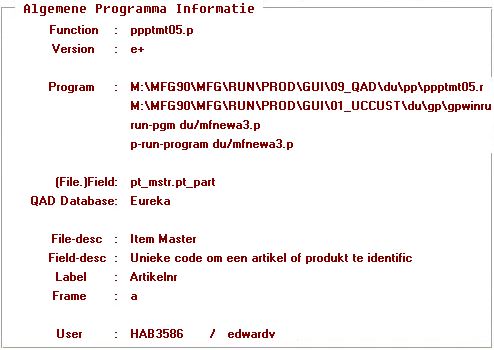
When I try to create a cim for ppptmt05 through qtcrcim.p, the screen of ppptmt05 opens but when I select an item en press F2, the following errors appear :
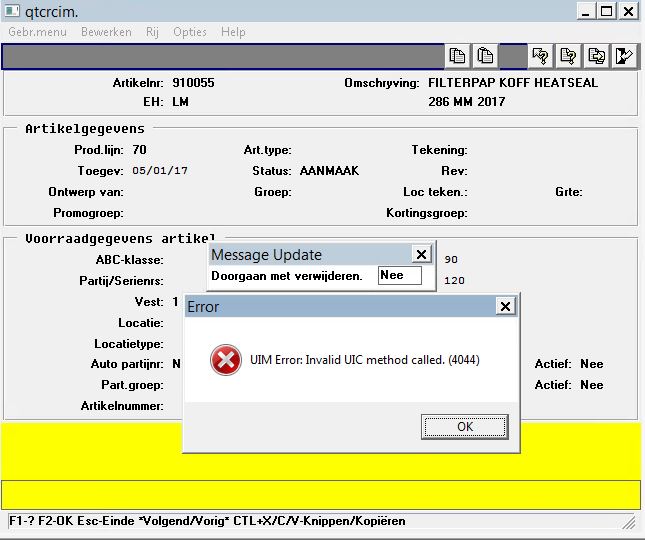
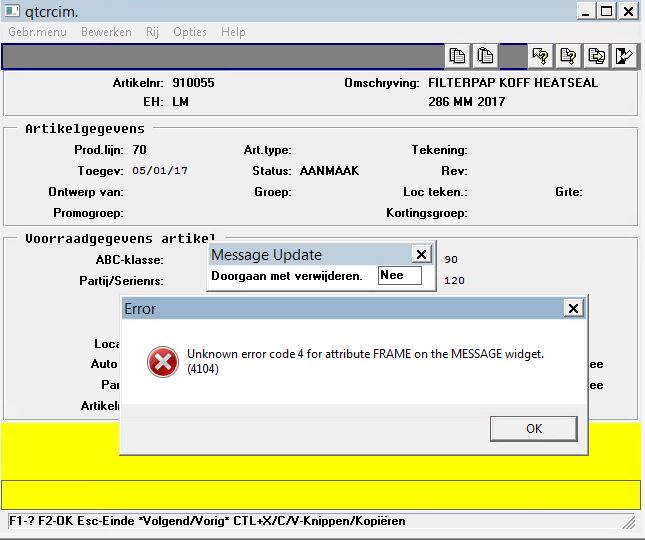
Any ideas how to solve this?
Phill Norrey, modified 8 Years ago.
Re: Delete records through CIM
Post Date: 9/20/17 (Yoda, 1010 Posts) Recent PostsThat is because ppptmt05.p is a special program already designed to do the delete without the batch delete program.
Your program would just look like:
@@batchload ppptmt05.p
"910055" YES
@@end
Edward Visser, modified 8 Years ago.
Re: Delete records through CIM
Post Date: 9/20/17 (Silver, 44 Posts) Recent PostsThanks for helping but all attempts still have no results.
I've just searched QAD's knowledbase and end up with the conclusion that our version of the ppptmt05.p needs a fix. We're running the file M:\MFG90\MFG\SRC\PROD\09_QAD\xrc\ppptmt05.p (28-03-2001 16.59).
Due to the findings I've just submitted an incident at QAD for help and/or a fix of the program.
Thanks for the help anyway.
Message place holder