 Forums
Message Boards
Operation Metrics History
Yagmur Kaya, modified 3 Years ago.
Operation Metrics History
Post Date: 11/13/17 (Silver, 40 Posts) Recent PostsHello everyone,
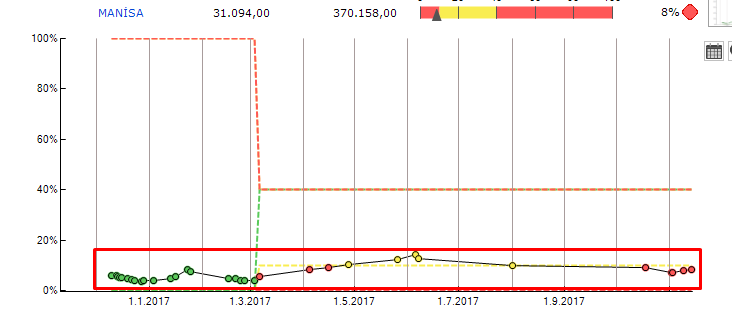
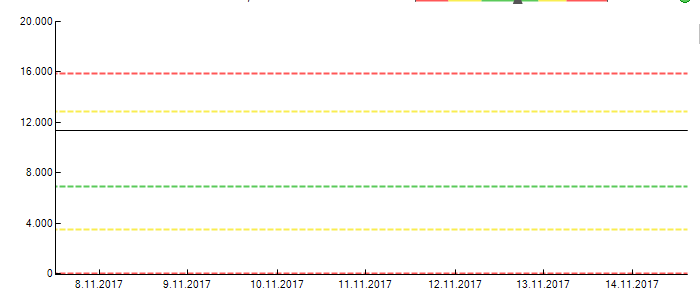
I created an operational metric but I couldn't see the point of value in history chart. I mean I want to see it like Pic 1. I tried the weekly view but it doesn't work. Thanks For Help..
Yagmur Kaya, modified 8 Years ago.
Re: Operation Metrics History
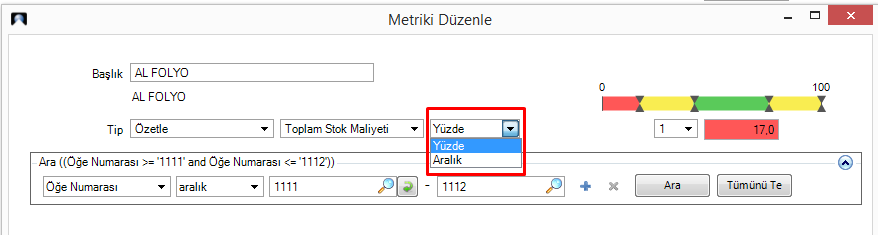
Post Date: 11/22/17 (Silver, 40 Posts) Recent PostsIf somebody searching for the answer, I will share my idea. I guess we have to select percentage when creating metrics as below;
Operational Metrics history data points shouldbe created each time the metric is run (e.g. opened by user, or refresh button executed, or can be optionallly scheduled to auto-run). A maximum of one data point per day is saved.
If you run a new metric, see its value, and then look at the histroy chart, you should see a data point for today's run.
To debug your situation, when you manually run the metric, what value is calculated?
Yagmur Kaya, modified 8 Years ago.
Re: Operation Metrics History
Post Date: 11/29/17 (Silver, 40 Posts) Recent PostsChad,
You're right. I run the metric manually and if I ran the metric one day I can see the data point for this date. But in "percentage" type I have been seeing data point for every time that I ran.
But for the other type I'm seeing only data point for the last date. However, I couldn't see data point for my first run date.
Thanks,
Message place holder