 Forums
Message Boards
CIM Load in Fixed Asset Transfers

Vinh Nguyen, modified 3 Years ago.
CIM Load in Fixed Asset Transfers
Post Date: 11/15/17 (Gold, 141 Posts) Recent PostsIn Fixed Asset Transfers, in second sreen - manual selection of the assets for transfer, how to achieve "Sel" field in CIM file. 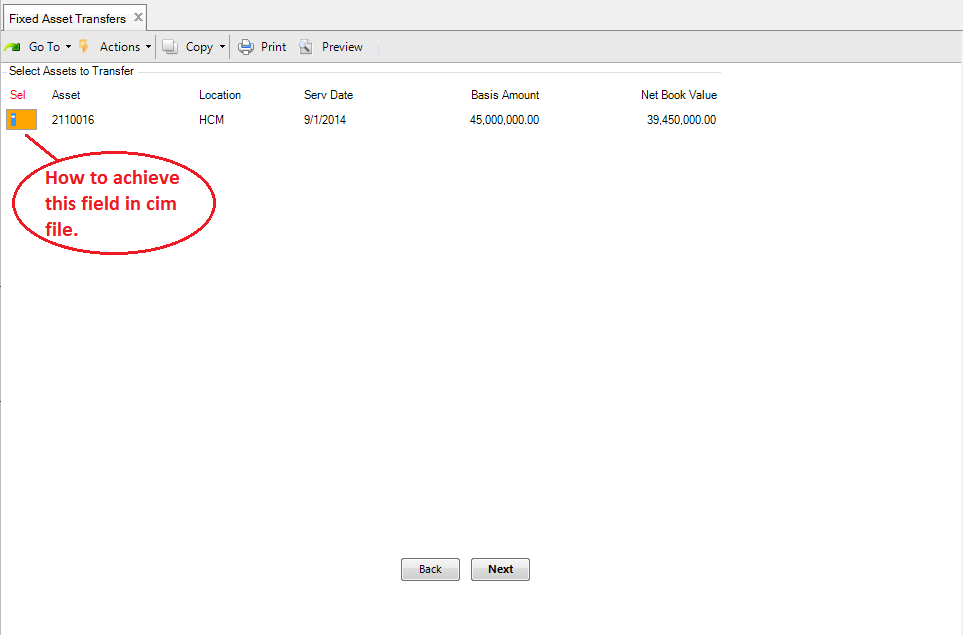

Phill Norrey, modified 8 Years ago.
Re: CIM Load in Fixed Asset Transfers
Post Date: 11/15/17 (Yoda, 1010 Posts) Recent PostsThe Fixed Assets module was not developed by QAd and therefore uses a different format. Not sure which version you are running but I remember that in one version they had buttons accross the bottom of the screen, but yours look like different format.
It looks like you would need to create a custom program probably similar to what QAD did with the costing screen. You cannot CIM load a cost using the 1.4.9 acreen because of the enter to select the line you need so they created a seperate program 1.4.15 to allow a CIM to be used to load the different cost elements
Vinh Nguyen, modified 8 Years ago.
Re: CIM Load in Fixed Asset Transfers
Post Date: 11/17/17 (Gold, 141 Posts) Recent PostsChi Lan, modified 8 Years ago.
Re: CIM Load in Fixed Asset Transfers
Post Date: 5/11/18 (Silver, 37 Posts) Recent PostsHi Phill,
According to QAD documents, we can use CIM with Fixed Asset Maintenance. I could use CIM to add new assets, modify existing assets, but could not transfer assets to another location. Does that mean we cannot use CIM for Transfer command in Fixed Asset Maintenance?
BTW, is there any list of programs that support CIM load in QAD? If yes, where can I find it?
Your prompt reply will be greatly appreciated.
Phill Norrey, modified 8 Years ago.
Re: CIM Load in Fixed Asset Transfers
Post Date: 5/17/18 (Yoda, 1010 Posts) Recent PostsYes you can use the CIM to load fixed assets but the methodology of the CIm is different because you can skip to different steps by building the name of the step into the CIM load rather than just F! and F4.
However, the Fixed Asset transfer program works by allowing you to select a range of assets and then using the up and down arrows to select which line you want you transfer. You cannot replicate the up and down arrow in a CIM.
What you would probably have to do is to use the first screen (not shown) to make it ONLY select one record and then you could possibly get the CIM to work, but again this would need to be tested
Message place holder